データベースクラスター情報の表示
The View Database Cluster Details feature allows users to:
- Monitor the operational status of the database cluster.
- Review current resource configurations (CPU, RAM, Storage).
- Check database engine, version, and network information.
- Identify system warnings (for example, restart required after compute scale-up).
- Quickly access related management functions.
To view database cluster details, log in to the FPT Console Portal, then navigate to Database Platform > All Database or Non-Relational Database. Select the Cluster ID of the target database cluster and open the Overview tab to access the detailed information page.
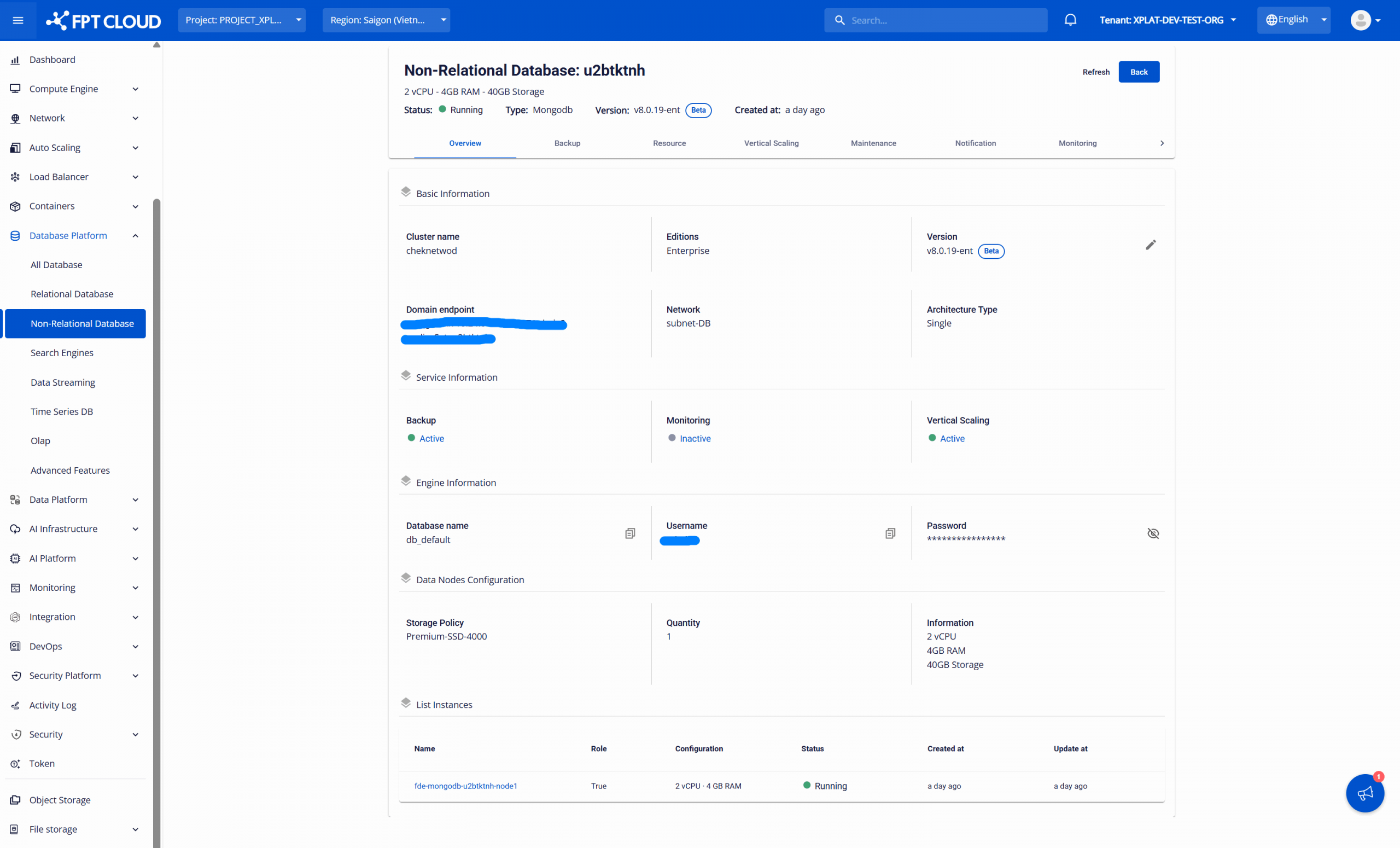
All core information of the database cluster is displayed in the following sections:
| Section | Information |
|---|---|
| Overview (Header Section) | Displays key information of the database cluster, including: |
- Database Cluster ID.
- Cluster status (for example: Running, Stopped).
- Current resource configuration: vCPU – RAM – Storage.
- Database engine type (for example: PostgreSQL, MySQL).
- Engine version (for example: 8.0.42, 17).
- Creation time.
Basic Information | Provides information required for application connectivity and infrastructure validation, including:
- Cluster name.
- Database type.
- Version.
- Endpoint (Domain/IP)
- Port
- Network/Subnet
- Architecture Type
Service Information | Displays the enable/disable status of accompanying services, including: Backup service, Monitoring service, and Vertical Scaling service.
Engine Information | Shows connection information for the default database, including: - Default database name.
- Default account credentials (username and password).
Data Nodes Configuration | Displays the configuration of nodes within the database cluster, including: - Storage policy.
- Number of nodes.
- Current resource configuration (vCPU – RAM – Storage).
List Instances | Lists all instances (nodes) belonging to the database cluster, enabling per-node status monitoring and troubleshooting. The information includes - Instance name
- Role: Primary (True) / Replica (False), if applicable
- Resource configuration
- Status
- Creation time
- Last update time