Voucher list
This tab displays all successfully applied vouchers. Here, you can track each voucher's details, including remaining credit, amount, validity period, applicable products, and status—helping you manage your usage plan effectively. 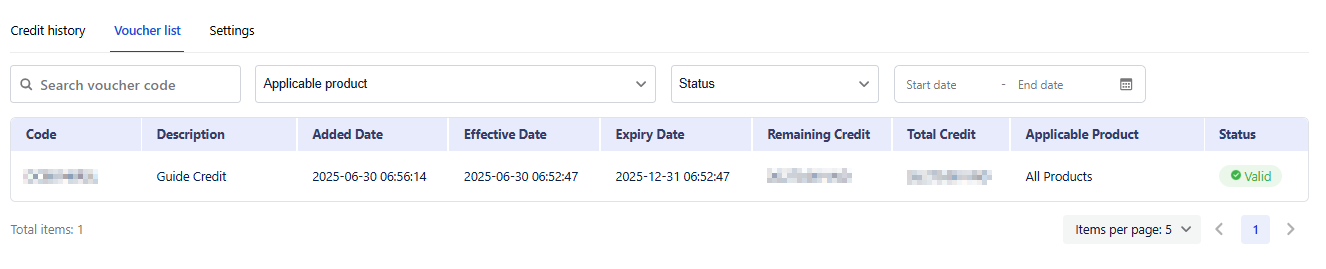
Table Fields Explanation
| Field | Description |
|---|---|
| Code | The voucher code is unique and can be used only once |
| Description | The voucher description includes its purpose, such as the name of the promotional campaign. |
| Added Date | The date the voucher code was applied |
| Effective Date | The date the credits became active |
| Expiry Date | The date the credits expire |
| Remaining Credit | The current available credit of the voucher |
| Total Credit | The total amount of credits received |
| Applicable Product | Products eligible for using the credits (all products or specific products) |
| Status | Current status of the credits |
| • Valid : Still within the valid date range and can be used to charge credits. | |
| • Expired : The voucher has passed its validity period. | |
| • Revoked : The voucher has been deactivated for a specific reason; any remaining credits are no longer usable. |
Table Filter
Filter allows users to apply multiple filters at the same time to quickly find specific transactions.
- Search Voucher Code : Enter a voucher code directly to quickly locate a specific transaction.
- Select multiple options of Applicable Product, Status
- Date Range : Set the time frame for the records you want to view using Start Date and End Date.