Templates are used to launch images as containers and define the required container disk size, volume, volume paths, and ports needed. You can also define environment variables and startup commands within the template.
Built-in Templates
These templates are maintained by FPT AI Factory. We now offer built-in templates:
- vLLM v0.8.1
- Intended Use: This vLLM container image is built and maintained by AI Factory. This template enables high throughput model inference using GPU resources with a state-of-the-art engine.
- Environment Variables: Some more useful environment variables are provided for container customization.
| Variable | Type | Description |
|---|
| HUGGING_FACE_HUB_TOKEN | string | Your Hugging Face User Access Token |
| Command | Arguments |
|---|
| python | --model deepseek-ai/DeepSeek-R1-Distill-Qwen-1.5B --dtype bfloat16 --gpu-memory-utilization 0.9 --max-model-len 8192 --api-key your_api_key |
| -m | / |
| vllm.entrypoints.openai.api_server | / |
- Jupyter Notebook
- Intended Use: This template provides Jupyter Lab to adopt remote development for AI/Data Scientists without local hardware limitations.
- Environment Variables: Some more useful environment variables are provided for container customization.
| Variable | Type | Default | Description |
|---|
| USERNAME | string | admin | Username to access Jupyter Notebook |
| PASSWORD | string | | Password to access Jupyter Notebook (Generated by system) |
- Ollama WebUI
- Intended Use: This template supports running various large language models (LLM) programs, including Ollama and APIs compatible with OpenAI, making it easy for users to customize based on workflow.
- Port:
- Ollama
- Intended Use: This template enables high-throughput model inference using GPU resources with state-of-the-art engine.
- Environment Variables: Some more useful environment variables are provided for container customization.
| Variable | Type | Description |
|---|
| API_TOKEN | string | Auto-authenticate with external services (Generated by system) |
- Code Server
- Intended Use: This template offers cloud-based VS Code with GPU to train, test, and debug AI models remotely with full IDE capabilities.
- Environment Variables: Some more useful environment variables are provided for container customization.
| Variable | Type | Default | Description |
|---|
| PUID | int | 0 | UserID |
| PGID | int | 0 | GroupID |
| TZ | string | Etc/UTC | Your timezone |
| PROXY_DOMAIN | string | code-server.my.domain | Domain will be proxied for subdomain proxying |
| DEFAULT_WORKSPACE | string | / | Default folder opened when accessing code-server |
| PASSWORD | string | / | Password to access code-server (Generated by system) |
- Ubuntu
- Intended Use: This is a minimal Ubuntu with several useful additions to improve your user experience. While the root account is available as usual, we have created a normal system user for your convenience.
- Port:
- Additional Software
- Docker: Docker is installed and automatically starts for you. The default user has been added to the docker group, allowing you to manage containers without requiring root privileges.
- Nvidia CUDA: Nvidia driver version 550.90.07 is preinstalled to the container providing CUDA version 12.4.
- vLLM v0.10.1
- Intended Use: This vLLM container image is built and maintained by AI Factory. This template enables high throughput model inference using GPU resources with state-of-the-art engine.
- Environment Variables: Some more useful environment variables are provided for container customization.
| Variable | Type | Description |
|---|
| HUGGING_FACE_HUB_TOKEN | string | Your Hugging Face User Access Token |
| Command | Arguments |
|---|
| python | --model openai/gpt-oss-20b --dtype bfloat16 --gpu-memory-utilization 0.9 --max-model-len 8192 --api-key your_api_key |
| -m | / |
| vllm.entrypoints.openai.api_server | / |
- NVIDIA Pytorch 25.03
| Command | Arguments |
|---|
| /bin/bash | / |
| -c | / |
| /usr/sbin/sshd && jupyter lab --ip=0.0.0.0 --port=8888 --allow-root --NotebookApp.token='your_token' --NotebookApp.password='' --notebook-dir=/workspace | / |
- Tensorflow 2.19.0
- NVIDIA CUDA 12.9.1
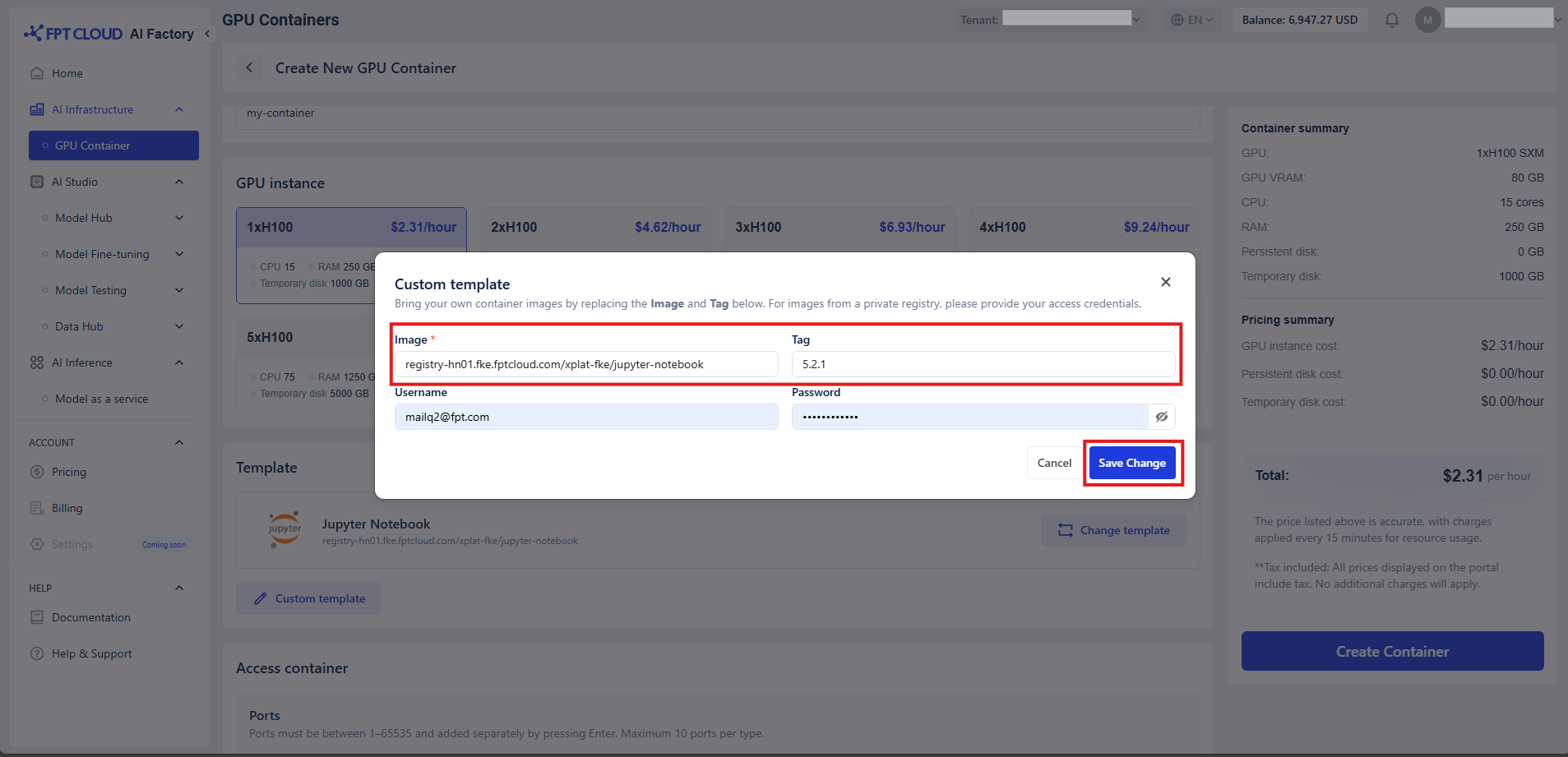
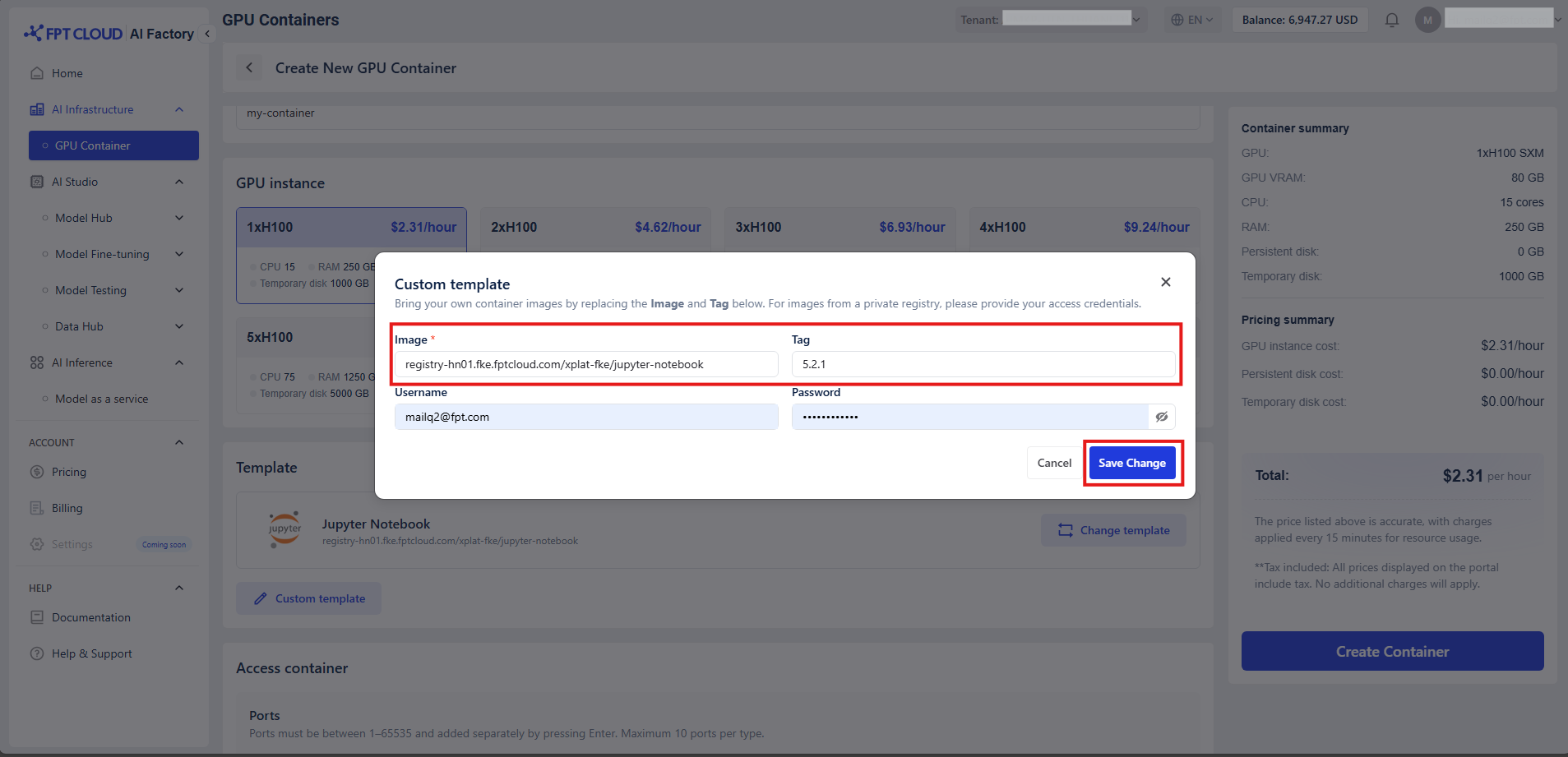
Custom Templates
You can use your own Docker image by clicking "Custom Template" and overriding your own image:tag. If your image is from a private Docker repository, make sure to provide your username and password for authentication.