Tag and push an image to FPT Container Registry
After logging in successfully, you need to tag your local image with the FPT Container Registry URI before pushing. This tells Docker the destination when performing the push.
-
Tag the local image with the FPT Container Registry URI:
docker tag SOURCE_IMAGE[:TAG] registry.fke.fptcloud.com/<registry-id>/REPOSITORY[:TAG]The
<registry-id>will be auto-filled if you copy the command from the FPT Portal.Example:
docker tag docker:20.10.12-dind registry.fke.fptcloud.com/088b6c2e-7fb9-4fd7-b906-779e99c63e32/docker:20.10.12-dind -
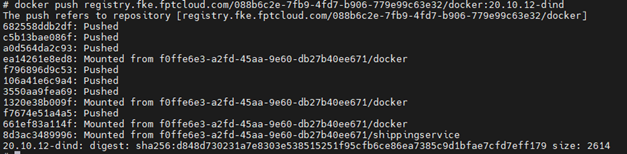
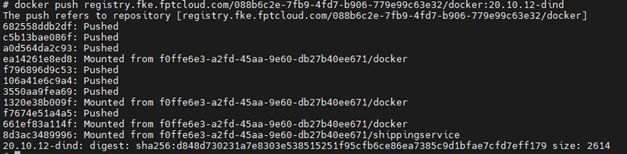
Push the image to FPT Container Registry:
docker push registry.fke.fptcloud.com/<registry-id>/REPOSITORY[:TAG]Example:
docker push registry.fke.fptcloud.com/088b6c2e-7fb9-4fd7-b906-779e99c63e32/docker:20.10.12-dind -
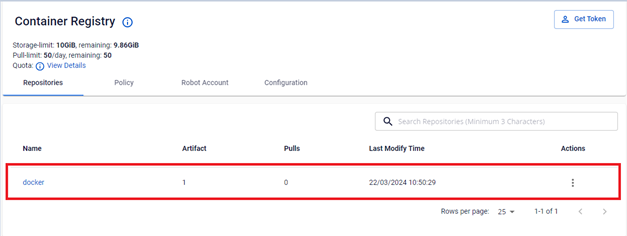
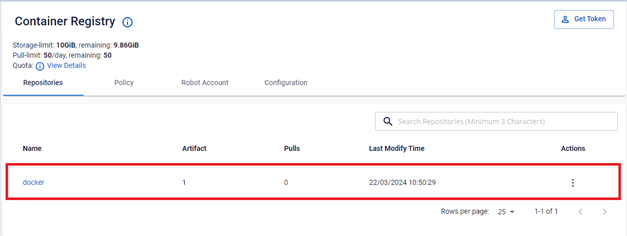
Verify the image push result on the Portal.