Dashboard overview
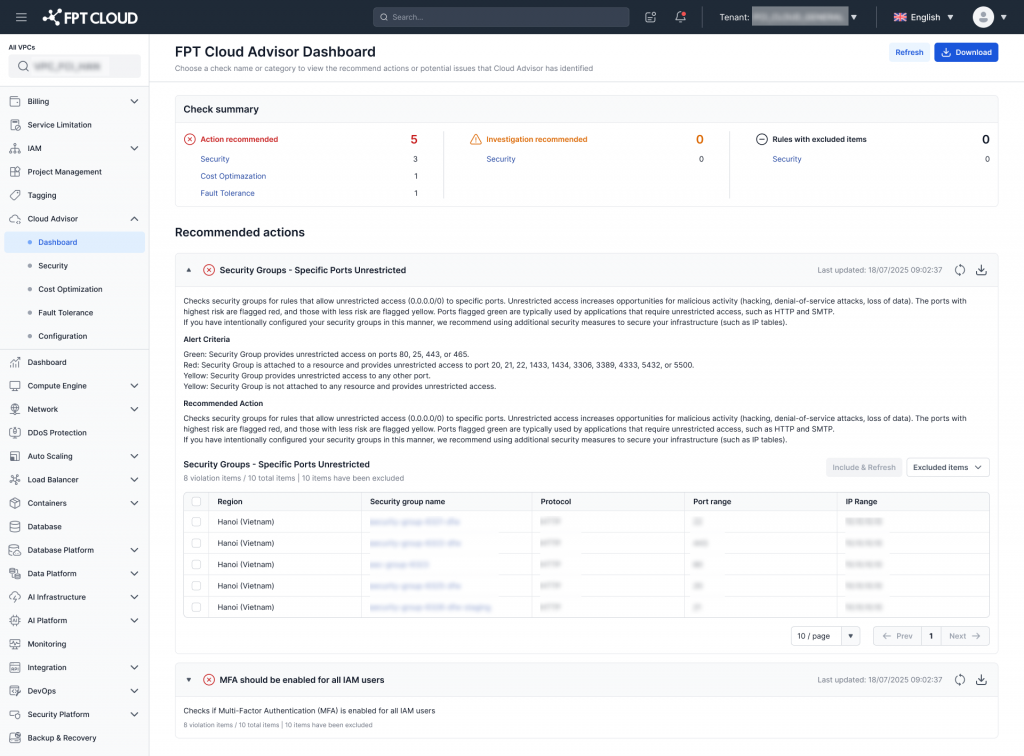
The dashboard displays:
- Action recommended: Number of issues that need to be addressed
- Investigation recommended: Issues that need further investigation
- Rules with excluded items: Rules where specific resources have been excluded from checks
Category groups
Each issue is grouped by category:
- Security: Aimed at reducing security risks and increasing system safety.
- Cost Optimization: Optimizing operating costs without affecting system performance.
- Fault Tolerance: Increasing stability and ensuring system availability.
Detected issues list
Below is the list of detected issues, for example:
Security Groups - Specific Ports Unrestricted: Detects a Security Group with a port open to the internet (0.0.0.0/0), which poses a security risk.
Issue details
Each issue includes:
- Issue name
- Timestamp of the most recent data update
- Refresh button
- Download button: supports exporting an Excel file with rule information and violating resources for internal reporting
- Issue description
- Number of resources currently in violation
User actions
You can:
- Select individual items
- Exclude items when they are intentionally configured or serve a special purpose (test, staging) so the rule does not alert again
- Refresh the results