Frequently Asked Questions
FAQ
1. What is FortiGate?
FortiGate, or Fortinet Firewall, is a next-generation multi-layer security appliance from Fortinet in the form of a firewall. FortiGate integrates best-in-class features to provide a comprehensive solution for information security and protecting internal network systems at businesses and organizations of all sizes. Fortinet Firewall gives users high-speed security capabilities, virus prevention, and blocks threats to your data center and network systems. FortiGate also supports web filtering, continuously inspecting packets exchanged between devices in the network, and offers visibility to help administrators easily monitor, detect, and promptly resolve unauthorized intrusions.
2. Why should you use FortiGate?
Let us review the outstanding features of the FortiGate product compared to conventional firewall appliances, to find the answer to the question "Why should you use FortiGate?".
- Comprehensive visibility and protection: FortiGate integrates features such as Ransomware and Command & Control prevention, SSL technology (including TLS 1.3) for secure encryption, and automatic threat protection.
- FortiGuard support: FortiGate is supported by FortiGuard with the ability to consolidate and simultaneously run IPS, web & video filtering, and DNS security services to reduce costs and manage all risks.
- Proxy integration: FortiGate provides a seamless user experience and secure protection for employee devices with the Zero Trust Network Access (ZTNA) feature.
- Advanced security: Advanced security solutions help prevent unauthorized access, access segmentation, and clear packet filtering.
- Automated network management: Maintain control with network traffic visibility, detailed and intuitive policy control, helping to expand security and network management capabilities.
3. How do I back up and restore Firewall configuration?
FortiGate supports simple and convenient configuration backup and restore. Log in to the system and select System configuration.
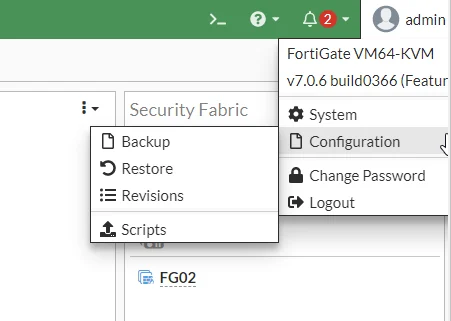
To save the current system configuration, select Backup.
To restore a saved configuration, click the Restore button. Click Browse to navigate to the location of the configuration file, then press OK. After restoring, it is recommended to restart the system.
4. Where can I find additional configuration guides?
Visit the Fortinet Documents Library at https://docs.fortinet.com/ to view additional FortiGate documentation. Reference documentation