Add New WAF Server
Create a new WAF server
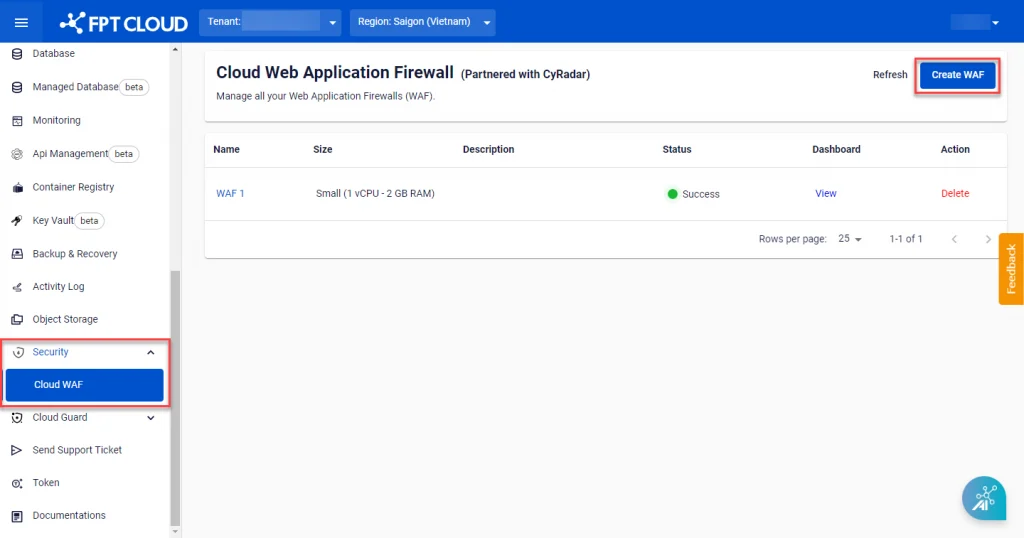
Step 1: In the menu, select Security > Cloud WAF, then select Create WAF.
Step 2: Enter the WAF information and select the appropriate size.
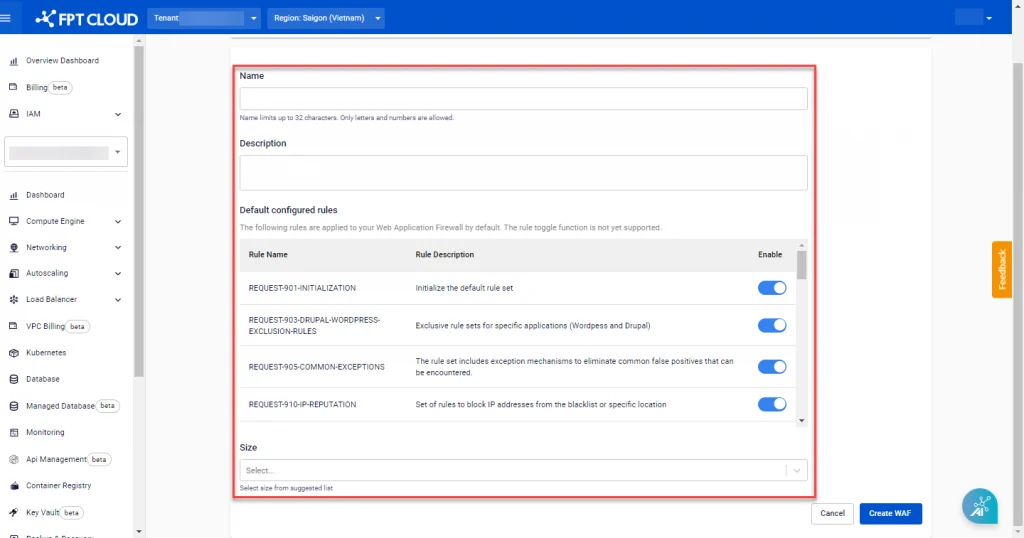
| Field | Description | Value |
|---|---|---|
| Name | Enter the WAF server name | Accepts letters, numbers, and spaces only |
| Description | Enter a detailed description of the WAF | |
| Default configured rules | List of default rule sets available on the WAF server upon creation | |
| Size | Select the WAF server size based on your requirements | 3 WAF sizes with different configurations: Small, Medium, Large |
You can refer to the specific configuration for each size in the table below:
| | | ---|---|---|--- Size | Basic configuration | Network bandwidth | Requests/second supported Small | 2vCPU – 4GB RAM – 150GB storage | 100 Mbps | 50 Medium | 4vCPU – 8GB RAM – 300GB storage | 200 Mbps | 150 Large | 8vCPU – 16GB RAM – 500GB storage | 500 Mbps | 500
Step 3: Select Create WAF to create the WAF server with the selected information and configuration. The processing progress will be updated in the Status field on the Cloud Web Application Firewall Management screen.