Deploy LoRA inference
How to deploy a fine-tuned LoRA model?
As a user, you can deploy your fine-tuned LoRA model to use it immediately via API without managing any infrastructure.
Steps
- Go to the Deployment page from the navigation bar.
- Or click View deployment from the success pop-up after fine-tuning.
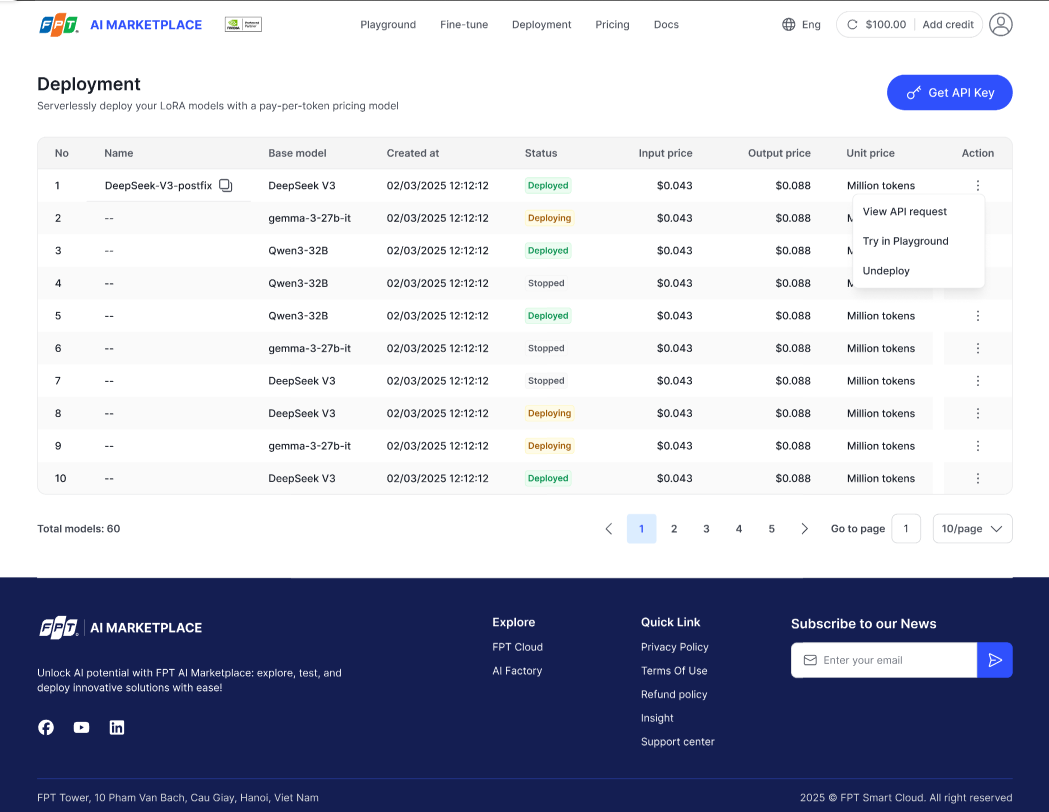
- Click Deploy next to the LoRA model you want to deploy.
- Status will change to Deploying.
- Once deployment is successful, the status will show Deployed.
How to manage deployed models?
On the Deployment page, you can:
- Get API Key — retrieve the key to call your model.
- View API request — open a pop-up with a sample JSON response.
- Try in Playground — test the model directly in the UI.
- Undeploy — stop the deployed model (confirmation required).
Status badges
- Deploying — model is being deployed.
- Deployed — model is ready for inference.
- Stopped — model is undeployed.
- Failed — deployment failed.