Create a policy
To use this feature, you must log in to the system with Tenant owner permissions.
Step 1: In the menu, select Policy Management > select Create policy.
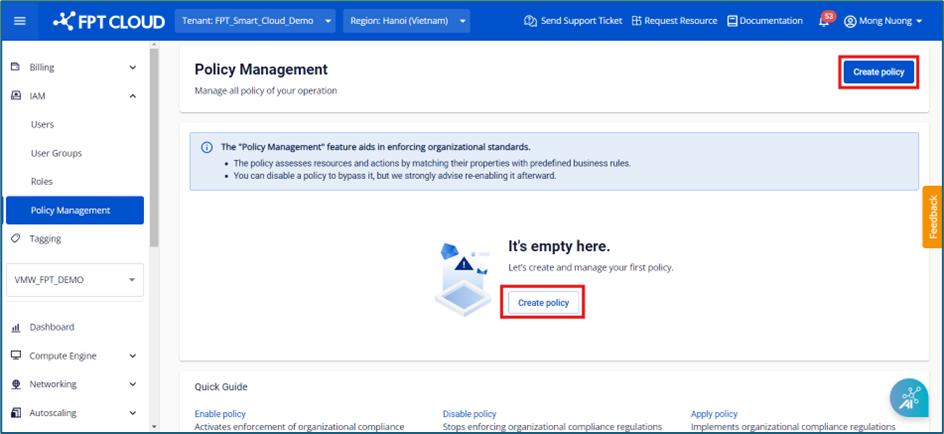
Step 2: Enter the required information:
- Policy Name: Enter the name of the policy.
- Apply to: Select the User group to which the policy applies.
- Resource type: Currently, the system only supports built-in rules for Security groups.
- Policy action: Select an action based on the system's built-in rules. Available built-in rules include:
- Security group: supports built-in rules only.
| Built-in rule | Definition |
|---|---|
| All TCP restriction when creating security group (built-in) | Prohibits creating rules that allow all TCP traffic from the internet to instances during Security group creation |
| All TCP restriction when editing security group (built-in) | Prohibits creating rules that allow all TCP traffic from the internet to instances during Security group editing |
| All traffic restriction when creating security group (built-in) | Prohibits creating rules that allow all traffic from the internet to instances during Security group creation |
| All traffic restriction when editing security group (built-in) | Prohibits creating rules that allow all traffic from the internet to instances during Security group editing |
| All UDP restriction when creating security group (built-in) | Prohibits creating rules that allow all UDP traffic from the internet to instances during Security group creation |
| All UDP restriction when editing security group (built-in) | Prohibits creating rules that allow all UDP traffic from the internet to instances during Security group editing |
| MSSQL-TCP restriction when creating security group (built-in) | Prohibits creating rules that allow access to port 1433 from all IPv4 to instances during Security group creation |
| MSSQL-TCP restriction when editing security group (built-in) | Prohibits creating rules that allow access to port 1433 from all IPv4 to instances during Security group editing |
| MSSQL-UDP restriction when creating security group (built-in) | Prohibits creating rules that allow access to port 1434 from all IPv4 to instances during Security group creation |
| MSSQL-UDP restriction when editing security group (built-in) | Prohibits creating rules that allow access to port 1434 from all IPv4 to instances during Security group editing |
| MySQL restriction when creating security group (built-in) | Prohibits creating rules that allow access to port 3306 from all IPv4 to instances during Security group creation |
| MySQL restriction when editing security group (built-in) | Prohibits creating rules that allow access to port 3306 from all IPv4 to instances during Security group editing |
| Oracle connection manager restriction when creating security group (built-in) | Prohibits creating rules that allow access to port 1830 from all IPv4 to instances during Security group creation |
| Oracle connection manager restriction when editing security group (built-in) | Prohibits creating rules that allow access to port 1830 from all IPv4 to instances during Security group editing |
| Oracle net services listener restriction when creating security group (built-in) | Prohibits creating rules that allow access to port 1521 from all IPv4 to instances during Security group creation |
| Oracle net services listener restriction when editing security group (built-in) | Prohibits creating rules that allow access to port 1521 from all IPv4 to instances during Security group editing |
| PostgreSQL restriction when creating security group (built-in) | Prohibits creating rules that allow access to port 5432 from all IPv4 to instances during Security group creation |
| PostgreSQL restriction when editing security group (built-in) | Prohibits creating rules that allow access to port 5432 from all IPv4 to instances during Security group editing |
| Remote desktop restriction when creating security group (built-in) | Prohibits creating rules that allow access to port 3389 from all IPv4 to instances during Security group creation |
| Remote desktop restriction when editing security group (built-in) | Prohibits creating rules that allow access to port 3389 from all IPv4 to instances during Security group editing |
| SSH restriction when creating security group (built-in) | Prohibits creating rules that allow access to port 22 from all IPv4 to instances during Security group creation |
| SSH restriction when editing security group (built-in) | Prohibits creating rules that allow access to port 22 from all IPv4 to instances during Security group editing |
- Tagging: Supports built-in rules and configurable conditions to meet customer requirements.
| Built-in rule | Rule | Rule config | Meaning |
|---|---|---|---|
| Assign tags to the new instance immediately after creation | All Instance | N/A | The system automatically assigns tags to all instances immediately upon creation |
| Assign tags to the new instance immediately after creation | Specific rule | Instance name include text | The system automatically assigns tags to an instance upon creation if the instance name contains the configured text |
| Assign tags to the new instance immediately after creation | Specific rule | Floating IP include/ in range | The system automatically assigns tags to an instance upon creation if the floating IP partially matches or falls within the configured IP range |
| Assign tags to the new instance immediately after creation | Specific rule | Private IP include/ in range | The system automatically assigns tags to an instance upon creation if the private IP partially matches or falls within the configured IP range |
| Assign tags to the new instance & related resources immediately after creation (related resource = Storage, IP, Subnet, Secgroup) | All Instance | N/A | The system automatically assigns tags to all instances and their related resources (Storage, IP, Subnet, Secgroup) immediately upon creation |
| Assign tags to the new instance & related resources immediately after creation (related resource = Storage, IP, Subnet, Secgroup) | Specific rule | Instance name include text | The system automatically assigns tags to the instance and related resources (Storage, IP, Subnet, Secgroup) upon creation if the instance name contains the configured text |
| Assign tags to the new instance & related resources immediately after creation (related resource = Storage, IP, Subnet, Secgroup) | Specific rule | Floating IP include/ in range | The system automatically assigns tags to the instance and related resources upon creation if the floating IP partially matches or falls within the configured IP range |
| Assign tags to the new instance & related resources immediately after creation (related resource = Storage, IP, Subnet, Secgroup) | Specific rule | Private IP include/ in range | The system automatically assigns tags to the instance and related resources upon creation if the private IP partially matches or falls within the configured IP range |
| Assign tags to the new storage immediately after creation | All Storage | N/A | The system automatically assigns tags to all storage volumes immediately upon creation |
| Assign tags to the new storage immediately after creation | Specific rule | Instance name include text | The system automatically assigns tags to storage upon creation if the storage name contains the configured text |
| Assign tags to the new floating IP immediately after creation | All Floating IP | N/A | The system automatically assigns tags to all Floating IPs immediately upon creation |
| Assign tags to the new floating IP immediately after creation | Specific rule | Floating IP include/ in range | The system automatically assigns tags to a Floating IP upon creation if the floating IP partially matches or falls within the configured IP range |
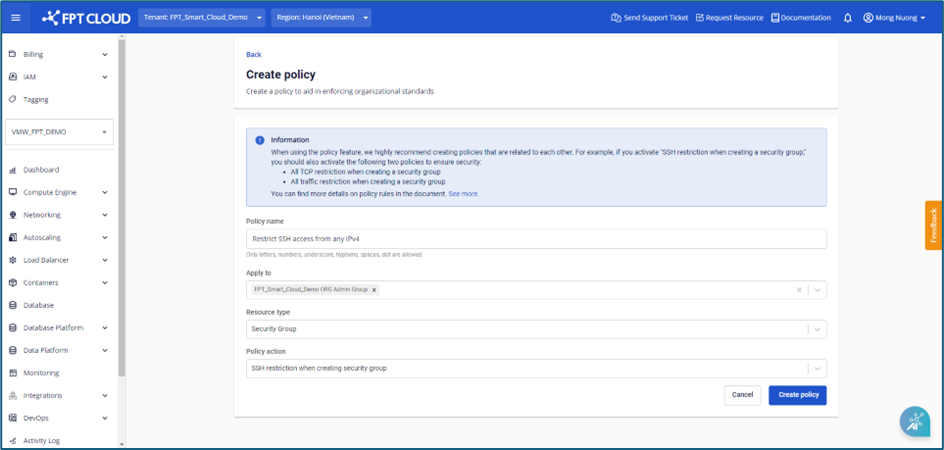
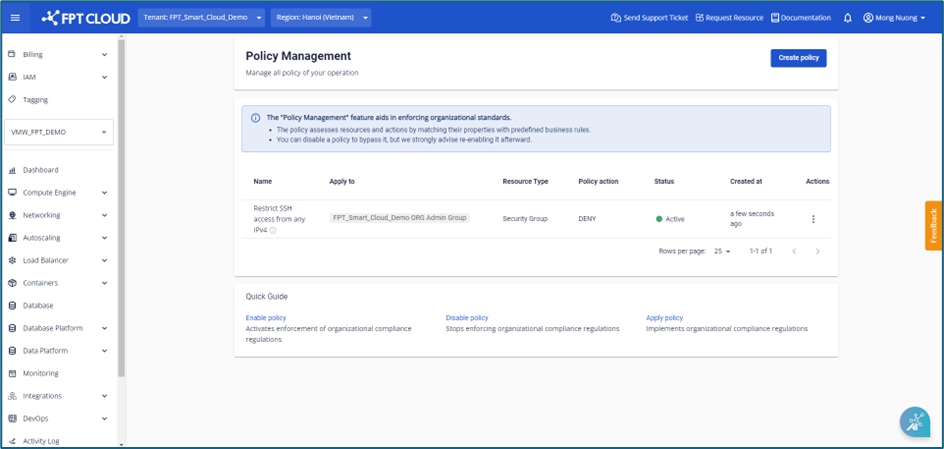
Step 3: Select Create policy. The new policy will be created and displayed on the Policy Management page.
note
- Only one policy can be applied per user group.
- To ensure policies are comprehensive, when creating policies that restrict access to specific ports, FPT Cloud recommends also creating the following related policies:
- Prohibit creating rules that allow all TCP traffic from the internet to instances during Security group creation.
- Prohibit creating rules that allow all TCP traffic from the internet to instances during Security group editing.
- Prohibit creating rules that allow all traffic from the internet to instances during Security group creation.
- Prohibit creating rules that allow all traffic from the internet to instances during Security group editing.
- Prohibit creating rules that allow all UDP traffic from the internet to instances during Security group creation.
- Prohibit creating rules that allow all UDP traffic from the internet to instances during Security group editing.