Snapshot Persistent Volume on Kubernetes
The snapshot persistent volume (PV) feature lets you create a snapshot of a PV in an M-FKE Kubernetes cluster by configuring and applying a YAML file that defines the desired PVC snapshot. Once the snapshot resource is created in the Kubernetes cluster, a corresponding snapshot is created in the VPC. Snapshots in MFKE are performed by the VolumeSnapshotClass component — you only need to specify the name of the PVC to snapshot. You can also schedule periodic PV snapshots by creating a script that continuously calls the Kubernetes API to create snapshots. See the Kubernetes documentation for reference: https://kubernetes.io/docs/concepts/storage/volume-snapshots/
In Kubernetes, a volume snapshot is a point-in-time copy of the contents of a PV in the cluster. You can use snapshots to back up cluster data or copy data to other resources without creating a new volume.
First, configure a VolumeSnapshotClass if none exists in the cluster:
apiVersion: snapshot.storage.k8s.io/v1
kind: VolumeSnapshotClass
metadata:
  name: csi-cinder-snapclass
  annotations:
    snapshot.storage.kubernetes.io/is-default-class: "true"
driver: cinder.csi.openstack.org
deletionPolicy: Delete
parameters:
  type: [type-storage-policy]
  force-create: "true"
Where [type-storage-policy] is the storage policy type you are using. You can find this value in the parameters/type field of the default StorageClass configuration.
You need a volume currently in use in the cluster (created by a PVC). Assume the PVC configuration is as follows:
apiVersion: v1
kind: PersistentVolumeClaim
metadata:
  name: test-pvc
  namespace: default
spec:
  accessModes:
    - ReadWriteOnce
  resources:
    requests:
      storage: 20Gi
Create a volume snapshot by defining a VolumeSnapshot in Kubernetes:
apiVersion: snapshot.storage.k8s.io/v1
kind: VolumeSnapshot
metadata:
  name: new-snapshot-test
  namespace: default
spec:
  volumeSnapshotClassName: csi-cinder-snapclass
  source:
    persistentVolumeClaimName: test-pvc
Where:
volumeSnapshotClassNameis provided by default by FPT Cloud. You can use anyvolumeSnapshotClassNamethat matches your requirements.persistentVolumeClaimNameis the name of the PVC you want to snapshot.
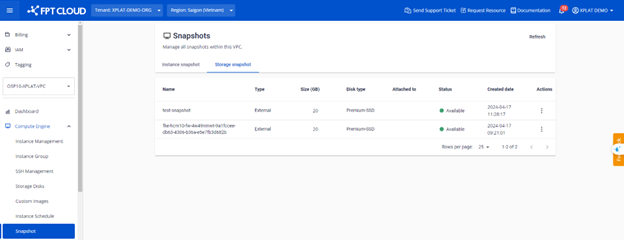
After creating the snapshot in Kubernetes, verify it in the Snapshot tab under Compute Engine on the Unify Portal:
And verify in Kubernetes with:
kubectl get volumesnapshots.snapshot.storage.k8s.io -n default