Auto Blocking Filter
Automatically adds IPs that satisfy the configured HTTP DoS/Risk Level by Rule conditions to the Blocking list.
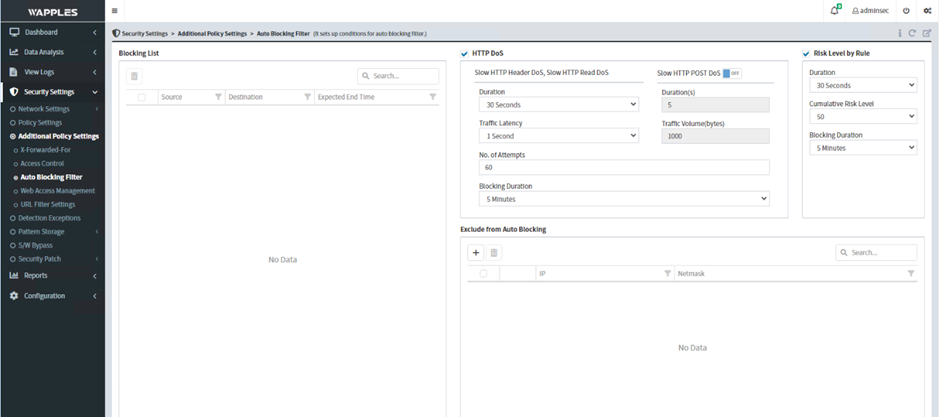
Risk Level by Rule — configure the condition fields for adding an IP to the blocklist:
- Duration: The time range for accumulating the risk level
- Cumulative Risk Level: The accumulated risk level corresponding to each rule risk in Policy Settings. When the threshold is reached, the IP is automatically blocked and added to the Blocking list
- Blocking Duration: The duration of the block. The IP is automatically removed from the IP Filter and the block list when the time expires
HTTP DoS — configure condition fields to protect against DoS attacks and add attacking IPs to the blacklist:
-
Slow HTTP Header DoS / Slow HTTP Read DoS
- Duration: The time window for recording an attack
- Traffic Latency: The delay time extended from the same source IP
- No. of Attempts: The number of delays recorded within the limit. If exceeded, the IP is added to the blocklist
- Blocking Duration: The duration of the block
-
Slow HTTP POST DoS (additional feature)
- Duration (s): The time window for recording an attack
- Traffic Volume (bytes): If traffic is below this level, it is considered an attack
- Exclude from Auto Blocking: Configure exceptions