ガイドライン: FSP Core ServiceのScanning APIをCI/CDパイプラインに統合する
ガイドライン: FSP Core ServiceのScanning APIをCI/CDパイプラインに統合する このガイドでは、FSP Core ServiceのスキャンエンドポイントをCI/CDパイプラインに統合する方法を説明します。これにより、変更のたびにソースコードスキャン、Secretスキャン、コンテナイメージのセキュリティスキャンを自動化できます。
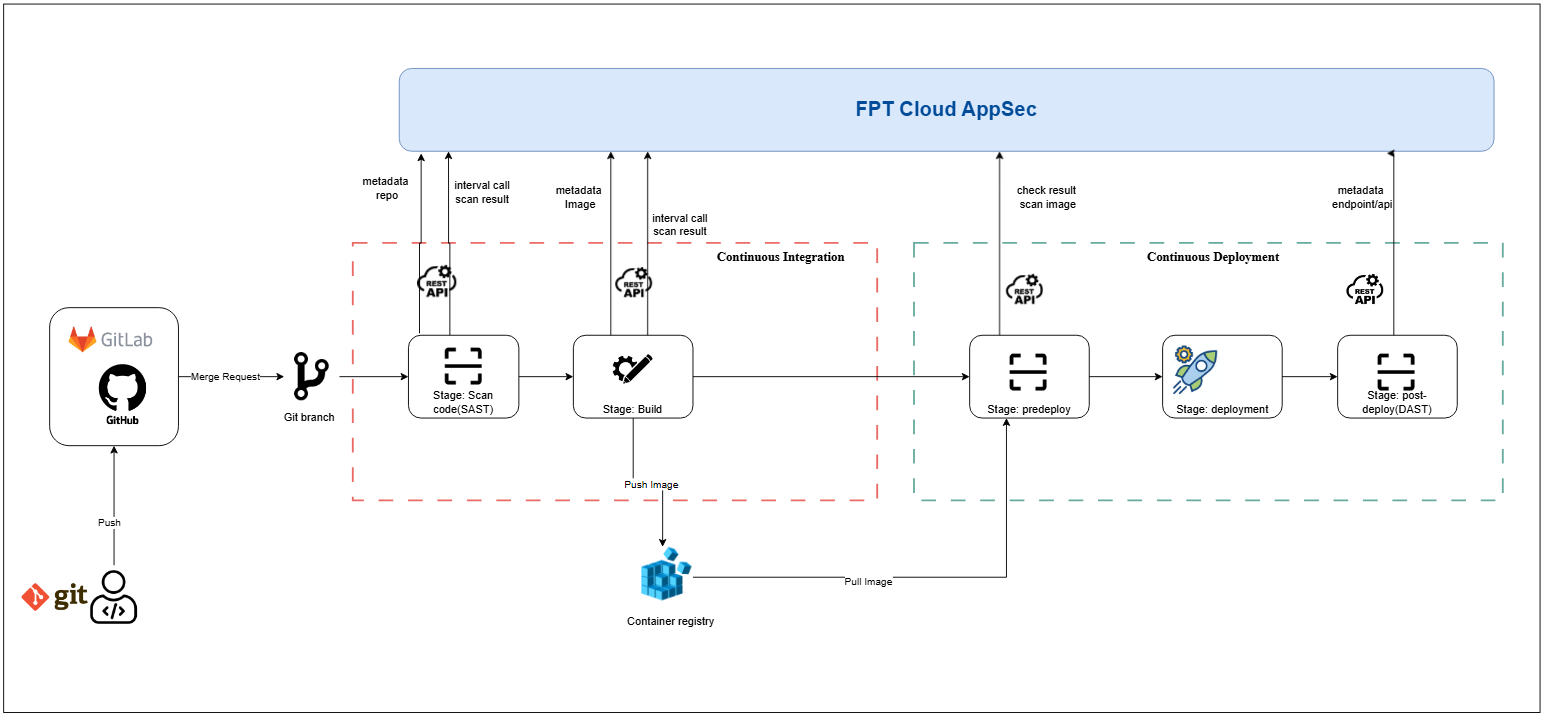
1. 概要
CI/CDパイプラインにセキュリティスキャンステップを自動化することで、脆弱性を早期に検出できます。このガイドでは以下を説明します。
- 準備要件
- 認証の設定方法
- コードスキャン、Secretスキャン、イメージスキャンのパイプライン統合手順
- 設定サンプル(GitLab CI、Jenkins)
2. 準備要件
- 有効なOrgidとaccess_keyを持つアクティブなFSP Core Serviceアカウント。
- APIエンドポイントへのアクセス(例: /integration/scan-code、/integration/scan-secret、/integration/scan-image および対応する結果取得エンドポイント)。
- FSP Core Service APIにネットワーク接続できるCI/CDランナーまたはエージェント。
- HTTP呼び出しスクリプトを記述するためのUnix系シェル環境(bash、sh)。
3. API仕様
3.1. コードスキャンの統合
3.1.1. 全ソースコードのスキャン
POST /api/v1/xplat/fsp-service/core-service/integration/scan-code
FSECグループの特定のリポジトリとコミットに対してソースコードスキャンを開始します。
リクエスト
Headers
| 名前 | 型 | 必須 | 説明 |
|---|---|---|---|
| Orgid | string | 任意 | 認証用の組織ID |
| Body | |||
| Content-Type: application/json | |||
| 名前 | 型 | 必須 | 説明 |
| --- | --- | --- | --- |
| team_code | string | 必須 | FSECグループのチームコード。team_codeの取得方法はこちら |
| git_repo_url | string | 必須 | GitリポジトリのURL(例: GitHubまたはGitLab) |
| access_key | string | 必須 | リポジトリアクセス用のFSEC発行のアクセスキー。Integration detail画面でのaccess_keyの取得方法はこちら(他の連携タイプも同様) |
| branch | string | 必須 | スキャン対象のブランチ名 |
| commit | string | 任意 | スキャン対象ブランチのコミットSHA |
| 例 |
CopyPOST /api/v1/xplat/fsp-service/core-service/integration/scan-code HTTP/1.1
Host: api.yourdomain.com
Orgid: 123e4567-e89b-12d3-a456-426614174000
Accept: application/json
Content-Type: application/json

{
  "team_code": "FSEC_TEAM_001",
  "git_repo_url": "https://github.com/example/repo.git",
  "access_key": "abcd1234",
  "branch": "main",
}
レスポンス
- 200 - Successful Response
Copy{
  "data": {
    "errorCode": "F-000",
    "errorMessage": "",
    "data": {
      "request_code": "",
      "request_time": "2025-03-25 13:34:11"
    }
  }
}
- 422 - Validation Error
Copy{
  "detail": [
    {
      "loc": ["string", 0],
      "msg": "string",
      "type": "string"
    }
  ]
}
3.1.2. コミット単位のスキャン
POST /api/v1/xplat/fsp-service/core-service/integration/scan-code?scan-mode=commit
FSECグループの特定のリポジトリとコミットに対してソースコードスキャンを開始します。
リクエスト
Headers
| 名前 | 型 | 必須 | 説明 |
|---|---|---|---|
| Orgid | string | 任意 | 認証用の組織ID |
| Body | |||
| Content-Type: application/json | |||
| 名前 | 型 | 必須 | 説明 |
| --- | --- | --- | --- |
| team_code | string | 必須 | FSECグループのチームコード。team_codeの取得方法はこちら |
| git_repo_url | string | 必須 | GitリポジトリのURL(例: GitHubまたはGitLab) |
| access_key | string | 必須 | リポジトリアクセス用のFSEC発行のアクセスキー。GitLab serverのaccess_key取得方法はこちら(他の連携タイプも同様) |
| branch | string | 必須 | スキャン対象のブランチ名 |
| commit | string | 必須 | スキャン対象ブランチのコミットSHA |
| 例 |
CopyPOST /api/v1/xplat/fsp-service/core-service/integration/scan-code?scan-mode=commit HTTP/1.1
Host: api.yourdomain.com
Orgid: 123e4567-e89b-12d3-a456-426614174000
Accept: application/json
Content-Type: application/json

{
  "team_code": "FSEC_TEAM_001",
  "git_repo_url": "https://github.com/example/repo.git",
  "access_key": "abcd1234",
  "branch": "main",
  "commit": "a1b2c3d4e5f6g7h8i9j0"
}
レスポンス
- 200 - Successful Response
Copy{
  "data": {
    "errorCode": "F-000",
    "errorMessage": "",
    "data": {
      "request_code": "",
      "request_time": "2025-03-25 13:34:11"
    }
  }
}
- 422 - Validation Error
Copy{
  "detail": [
    {
      "loc": ["string", 0],
      "msg": "string",
      "type": "string"
    }
  ]
}
3.2. Secretスキャンの統合
3.2.1. 全ソースコードのスキャン
POST /api/v1/xplat/fsp-service/core-service/integration/scan-secret FSECグループの特定のリポジトリとコミットに対してSecretスキャンを開始します。
リクエスト
Headers
| 名前 | 型 | 必須 | 説明 |
|---|---|---|---|
| Orgid | string | 任意 | 認証用の組織ID |
| Body | |||
| Content-Type: application/json | |||
| 名前 | 型 | 必須 | 説明 |
| --- | --- | --- | --- |
| team_code | string | 必須 | FSECグループのチームコード。team_codeの取得方法はこちら |
| git_repo_url | string | 必須 | GitリポジトリのURL(例: GitHubまたはGitLab) |
| access_key | string | 必須 | リポジトリアクセス用のFSEC発行のアクセスキー。GitLab serverのaccess_key取得方法はこちら(他の連携タイプも同様) |
| branch | string | 必須 | スキャン対象のブランチ名 |
| commit | string | 任意 | スキャン対象ブランチのコミットSHA |
| 例 |
CopyPOST /api/v1/xplat/fsp-service/core-service/integration/scan-secret HTTP/1.1
Host: api.yourdomain.com
Orgid: 123e4567-e89b-12d3-a456-426614174000
Accept: application/json
Content-Type: application/json

{
  "team_code": "FSEC_TEAM_001",
  "git_repo_url": "https://github.com/example/repo.git",
  "access_key": "abcd1234",
  "branch": "main",
}
レスポンス
- 200 - Successful Response
Copy{
  "data": {
    "errorCode": "F-000",
    "errorMessage": "",
    "data": {
      "request_code": "",
      "request_time": "2025-03-25 13:34:11"
    }
  }
}
- 422 - Validation Error
Copy{
  "detail": [
    {
      "loc": ["string", 0],
      "msg": "string",
      "type": "string"
    }
  ]
}
3.2.2. コミット単位のスキャン
POST /api/v1/xplat/fsp-service/core-service/integration/scan-secret?scan-mode=commit FSECグループの特定のリポジトリとコミットに対してSecretスキャンを開始します。
リクエスト
Headers
| 名前 | 型 | 必須 | 説明 |
|---|---|---|---|
| Orgid | string | 任意 | 認証用の組織ID |
| Body | |||
| Content-Type: application/json | |||
| 名前 | 型 | 必須 | 説明 |
| --- | --- | --- | --- |
| team_code | string | 必須 | FSECグループのチームコード。team_codeの取得方法はこちら |
| git_repo_url | string | 必須 | GitリポジトリのURL(例: GitHubまたはGitLab) |
| access_key | string | 必須 | リポジトリアクセス用のFSEC発行のアクセスキー。GitLab serverのaccess_key取得方法はこちら(他の連携タイプも同様) |
| branch | string | 必須 | スキャン対象のブランチ名 |
| commit | string | 必須 | スキャン対象ブランチのコミットSHA |
| 例 |
CopyPOST /api/v1/xplat/fsp-service/core-service/integration/scan-secret?scan-mode=commit HTTP/1.1
Host: api.yourdomain.com
Orgid: 123e4567-e89b-12d3-a456-426614174000
Accept: application/json
Content-Type: application/json

{
  "team_code": "FSEC_TEAM_001",
  "git_repo_url": "https://github.com/example/repo.git",
  "access_key": "abcd1234",
  "branch": "main",
  "commit": "a1b2c3d4e5f6g7h8i9j0"
}
レスポンス
- 200 - Successful Response
Copy{
  "data": {
    "errorCode": "F-000",
    "errorMessage": "",
    "data": {
      "request_code": "",
      "request_time": "2025-03-25 13:34:11"
    }
  }
}
- 422 - Validation Error
Copy{
  "detail": [
    {
      "loc": ["string", 0],
      "msg": "string",
      "type": "string"
    }
  ]
}
3.3. イメージスキャンの統合
POST /api/v1/xplat/fsp-service/core-service/integration/scan-image FSECグループの特定のリポジトリとコミットに対してイメージスキャンを開始します。
リクエスト
Headers
| 名前 | 型 | 必須 | 説明 |
|---|---|---|---|
| Orgid | string | 任意 | 認証用の組織ID |
| Body | |||
| Content-Type: application/json | |||
| 名前 | 型 | 必須 | 説明 |
| --- | --- | --- | --- |
| team_code | string | 必須 | FSECグループのチームコード。team_codeの取得方法はこちら |
| access_key | string | 必須 | イメージレジストリ用のFSEC発行のアクセスキー。GitLab serverのaccess_key取得方法はこちら(他の連携タイプも同様) |
| image_url | string | 必須 | イメージのレジストリパスとタグ(例: repo:tag) |
| 例 |
CopyPOST /api/v1/xplat/fsp-service/core-service/integration/scan-image HTTP/1.1
Host: api.yourdomain.com
Orgid: 123e4567-e89b-12d3-a456-426614174000
Accept: application/json
Content-Type: application/json

{
  "team_code": "FSEC_TEAM_001",
  "access_key": "abcd1234",
  "image_url": "registry.example.com/myapp:latest"
}
レスポンス
- 200 - Successful Response
Copy{
  "data": {
    "errorCode": "F-000",
    "errorMessage": "",
    "data": {
      "request_code": "",
      "request_time": "2025-03-25 13:34:11"
    }
  }
}
- 422 - Validation Error
Copy{
  "detail": [
    {
      "loc": ["string", 0],
      "msg": "string",
      "type": "string"
    }
  ]
}
3.4. コードスキャン結果の取得
POST /api/v1/xplat/fsp-service/core-service/integration/get-scan-code-result request_codeを使用して、以前に開始したソースコードスキャンの結果を取得します。
リクエスト
Headers
| 名前 | 型 | 必須 | 説明 |
|---|---|---|---|
| Orgid | string | 任意 | 認証用の組織ID |
| Body | |||
| Content-Type: application/json | |||
| 名前 | 型 | 必須 | 説明 |
| --- | --- | --- | --- |
| request_code | string | 必須 | /scan-codeから返されたリクエストコード |
| access_key | string | 必須 | FSEC発行のアクセスキー。GitLab serverのaccess_key取得方法はこちら(他の連携タイプも同様) |
| 例 |
CopyPOST /api/v1/xplat/fsp-service/core-service/integration/get-scan-code-result HTTP/1.1
Host: api.yourdomain.com
Orgid: 123e4567-e89b-12d3-a456-426614174000
Accept: application/json
Content-Type: application/json

{
  "request_code": "RSC-123456",
  "access_key": "abcd1234"
}
レスポンス
- 200 - Successful Response
Copy{
    "errorCode": "F-000",
    "errorMessage": "",
    "data": {
        "request_code": "RSC-123456",
        "scan_status": "FINISHED",
        "scan_result_status": "SUCCESS",
        "scan_result": {
            "C": 0,
            "H": 0,
            "L": 0,
            "M": 4
        },
        "result_details": {
            "scanCode": {
                "M": 4,
                "L": 0,
                "H": 0,
                "C": 0
            }
        },
        "finish_time": "2025-08-18 04:32:30.137421",
        "quatity_gate": null
    }
}
- 422 - Validation Error
Copy{
  "detail": [
    {
      "loc": ["string", 0],
      "msg": "string",
      "type": "string"
    }
  ]
}
3.5. Secretスキャン結果の取得
POST /api/v1/xplat/fsp-service/core-service/integration/get-scan-secret-result request_codeを使用して、以前に開始したSecretスキャンの結果を取得します。
リクエスト
Headers
| 名前 | 型 | 必須 | 説明 |
|---|---|---|---|
| Orgid | string | 任意 | 認証用の組織ID |
| Body | |||
| Content-Type: application/json | |||
| 名前 | 型 | 必須 | 説明 |
| --- | --- | --- | --- |
| request_code | string | 必須 | /scan-secretから返されたリクエストコード |
| access_key | string | 必須 | FSEC発行のアクセスキー。GitLab serverのaccess_key取得方法はこちら(他の連携タイプも同様) |
| 例 |
CopyPOST /api/v1/xplat/fsp-service/core-service/integration/get-scan-secret-result HTTP/1.1
Host: api.yourdomain.com
Orgid: 123e4567-e89b-12d3-a456-426614174000
Accept: application/json
Content-Type: application/json

{
  "request_code": "RSC-123456",
  "access_key": "abcd1234"
}
レスポンス
- 200 - Successful Response
Copy{
    "errorCode": "F-000",
    "errorMessage": "",
    "data": {
        "request_code": "RSC-123456",
        "scan_status": "FINISHED",
        "scan_result_status": "SUCCESS",
        "scan_result": {
            "C": 0,
            "H": 0,
            "L": 0,
            "M": 4
        },
        "result_details": {
            "scanCode": {
                "M": 4,
                "L": 0,
                "H": 0,
                "C": 0
            }
        },
        "finish_time": "2025-08-18 04:32:30.137421",
        "quatity_gate": null
    }
}
- 422 - Validation Error
Copy{
  "detail": [
    {
      "loc": ["string", 0],
      "msg": "string",
      "type": "string"
    }
  ]
}
3.6. イメージスキャン結果の取得
POST /api/v1/xplat/fsp-service/core-service/integration/get-scan-image-result request_codeを使用して、以前に開始したイメージスキャンの結果を取得します。
リクエスト
Headers
| 名前 | 型 | 必須 | 説明 |
|---|---|---|---|
| Orgid | string | 任意 | 認証用の組織ID |
| Body | |||
| Content-Type: application/json | |||
| 名前 | 型 | 必須 | 説明 |
| --- | --- | --- | --- |
| request_code | string | 必須 | /scan-imageから返されたリクエストコード |
| access_key | string | 必須 | FSEC発行のアクセスキー。GitLab serverのaccess_key取得方法はこちら(他の連携タイプも同様) |
| 例 |
CopyPOST /api/v1/xplat/fsp-service/core-service/integration/get-scan-image-result HTTP/1.1
Host: api.yourdomain.com
Orgid: 123e4567-e89b-12d3-a456-426614174000
Accept: application/json
Content-Type: application/json

{
  "request_code": "RSC-123456",
  "access_key": "abcd1234"
}
レスポンス
- 200 - Successful Response
Copy{
    "errorCode": "F-000",
    "errorMessage": "",
    "data": {
        "request_code": "RSC-123456",
        "scan_status": "FINISHED",
        "scan_result_status": "SUCCESS",
        "scan_result": {
            "C": 0,
            "H": 0,
            "L": 0,
            "M": 4
        },
        "result_details": {
            "scanCode": {
                "M": 4,
                "L": 0,
                "H": 0,
                "C": 0
            }
        },
        "finish_time": "2025-08-18 04:32:30.137421",
        "quatity_gate": null
    }
}
- 422 - Validation Error
Copy{
  "detail": [
    {
      "loc": ["string", 0],
      "msg": "string",
      "type": "string"
    }
  ]
}
4. パイプラインフロー
4.1. コードスキャンステージ(ソースチェックアウト後)
- スキャンの起動 :
-
* 全ソースコードのスキャン: リポジトリの詳細情報を指定して `POST /api/v1/xplat/fsp-service/core-service/integration/scan-code` を呼び出します。 -
* コミット単位のスキャン: リポジトリの詳細情報を指定して `POST /api/v1/xplat/fsp-service/core-service/integration/scan-code?scan-mode=commit` を呼び出します。 - 結果の取得 :
POST /api/v1/xplat/fsp-service/core-service/integration/get-scan-code-resultを呼び出し、scan_result_status = SUCCESS になるまで繰り返します。 - 合否の評価 : scan_result フィールドの結果または独自のクオリティゲート(quality gate)の閾値に基づいて判定します。
4.2. Secretスキャンステージ(ソースチェックアウト後)
- スキャンの起動 : コードスキャンと同じペイロードで
POST /api/v1/xplat/fsp-service/core-service/integration/scan-secretを呼び出します。 - 結果の取得 :
POST /api/v1/xplat/fsp-service/core-service/integration/get-scan-secret-resultを呼び出し、scan_result_status = SUCCESS になるまで繰り返します。 - 合否の評価 : scan_result フィールドの結果または独自のクオリティゲートの閾値に基づいて判定します。
4.3. イメージスキャンステージ(ビルド後)
- スキャンの起動 : イメージタグを指定して
POST /api/v1/xplat/fsp-service/core-service/integration/scan-imageを呼び出します。 - 結果の取得 :
POST /api/v1/xplat/fsp-service/core-service/integration/get-scan-image-resultを呼び出し、scan_result_status = SUCCESS になるまで繰り返します。 - 合否の評価 : scan_result フィールドの結果または独自のクオリティゲートの閾値に基づいて判定します。
5. 設定サンプル
5.1. GitLab CI
Copyvariables:
  ORGID: "$FSP_ORGID"
  ACCESS_KEY: "$FSP_ACCESS_KEY"
  API_URL: "https://api.yourdomain.com/api/v1/xplat/fsp-service/core-service"
  TEAM_CODE: "FSEC_TEAM_001"

stages:
  - code-scan
  - secret-scan
  - build
  - image-scan

.scan-stage: &scan-stage
  image: alpine:latest
  before_script:
    - apk add --no-cache curl jq
  script:
    - echo "Trigger scan"
    - RESPONSE=$(curl -s -X POST "$API_URL/integration/${ENDPOINT}" \
        -H "Orgid: $ORGID" \
        -H "access_key: $ACCESS_KEY" \
        -H "Content-Type: application/json" \
        -d "{\"team_code\":\"$TEAM_CODE\",\"git_repo_url\":\"$CI_PROJECT_URL.git\",\"branch\":\"$CI_COMMIT_REF_NAME\",\"commit\":\"$CI_COMMIT_SHA\"}")
    - CODE=$(echo "$RESPONSE" | jq -r '.data.data.request_code')
    - |
      echo "Polling for scan result..."
      until [ "$(curl -s -X POST "$API_URL/integration/$RESULT_ENDPOINT" \
            -H "Orgid: $ORGID" -H "access_key: $ACCESS_KEY" \
            -H "Content-Type: application/json" \
            -d "{\"request_code\":\"$CODE\",\"access_key\":\"$ACCESS_KEY\"}" \
        | jq -r '.data.data.status')" = "COMPLETED" ]; do
        sleep 10
      done
    - ISSUES=$(curl -s -X POST "$API_URL/integration/$RESULT_ENDPOINT" \
        -H "Orgid: $ORGID" -H "access_key: $ACCESS_KEY" \
        -H "Content-Type: application/json" \
        -d "{\"request_code\":\"$CODE\",\"access_key\":\"$ACCESS_KEY\"}" \
        | jq '.data.data.issues_found')
    - if [ "$ISSUES" -gt 0 ]; then echo "Found $ISSUES issues in $ENDPOINT"; exit 1; fi

code-scan:
  stage: code-scan
  variables:
    ENDPOINT: "scan-code"
    RESULT_ENDPOINT: "get-scan-code-result"
  <<: *scan-stage

secret-scan:
  stage: secret-scan
  variables:
    ENDPOINT: "scan-secret"
    RESULT_ENDPOINT: "get-scan-secret-result"
  <<: *scan-stage

build:
  stage: build
  script:
    - docker build -t myapp:$CI_COMMIT_SHA .

image-scan:
  stage: image-scan
  script:
    - echo "Trigger image scan"
    - RESPONSE=$(curl -s -X POST "$API_URL/integration/scan-image" \
        -H "Orgid: $ORGID" \
        -H "access_key: $ACCESS_KEY" \
        -H "Content-Type: application/json" \
        -d "{\"team_code\":\"$TEAM_CODE\",\"access_key\":\"$ACCESS_KEY\",\"image_url\":\"registry.example.com/myapp:$CI_COMMIT_SHA\"}")
    - CODE=$(echo "$RESPONSE" | jq -r '.data.data.request_code')
    - |
      echo "Polling for image scan result..."
      until [ "$(curl -s -X POST "$API_URL/integration/get-scan-image-result" \
            -H "Orgid: $ORGID" -H "access_key: $ACCESS_KEY" \
            -H "Content-Type: application/json" \
            -d "{\"request_code\":\"$CODE\",\"access_key\":\"$ACCESS_KEY\"}" \
        | jq -r '.data.data.scan_status')" = "COMPLETED" ]; do
        sleep 10
      done
    - HIGH=$(curl -s -X POST "$API_URL/integration/get-scan-image-result" \
        -H "Orgid: $ORGID" -H "access_key: $ACCESS_KEY" \
        -H "Content-Type: application/json" \
        -d "{\"request_code\":\"$CODE\",\"access_key\":\"$ACCESS_KEY\"}" \
        | jq '.data.data.scan_result.H')
    - if [ "$HIGH" -gt 0 ]; then echo "High severity issues found"; exit 1; fi
5.2. Jenkins Pipeline
Copypipeline {
  agent any
  environment {
    ORGID = credentials('FSP_ORGID')
    ACCESS_KEY = credentials('FSP_ACCESS_KEY')
    API_URL = 'https://api.yourdomain.com/api/v1/xplat/fsp-service/core-service'
  }
  stages {
    stage('Code Scan') {
      steps {
        script {
          def payload = [team_code: 'FSEC_TEAM_001', git_repo_url: env.GIT_URL, branch: env.BRANCH_NAME, commit: env.GIT_COMMIT]
          def response = httpRequest acceptType: 'APPLICATION_JSON', contentType: 'APPLICATION_JSON', httpMode: 'POST', requestBody: groovy.json.JsonOutput.toJson(payload), url: "${API_URL}/integration/scan-code", customHeaders: [[name:'Orgid', value:ORGID], [name:'access_key', value:ACCESS_KEY]]
          def code = readJSON(text: response.content).data.data.request_code
          timeout(time: 5, unit: 'MINUTES') {
            waitUntil {
              def result = httpRequest acceptType: 'APPLICATION_JSON', contentType: 'APPLICATION_JSON', httpMode: 'POST', requestBody: groovy.json.JsonOutput.toJson([request_code: code, access_key: ACCESS_KEY]), url: "${API_URL}/integration/get-scan-code-result", customHeaders: [[name:'Orgid', value:ORGID], [name:'access_key', value:ACCESS_KEY]]
              return readJSON(text: result.content).data.data.status == 'COMPLETED'
            }
          }
          def issues = readJSON(text: result.content).data.data.issues_found
          if (issues > 0) { error "Found ${issues} code issues" }
        }
      }
    }
    stage('Secret Scan') {
      steps {
        script {
          def payload = [team_code: 'FSEC_TEAM_001', git_repo_url: env.GIT_URL, branch: env.BRANCH_NAME, commit: env.GIT_COMMIT]
          def response = httpRequest acceptType: 'APPLICATION_JSON', contentType: 'APPLICATION_JSON', httpMode: 'POST', requestBody: groovy.json.JsonOutput.toJson(payload), url: "${API_URL}/integration/scan-secret", customHeaders: [[name:'Orgid', value:ORGID], [name:'access_key', value:ACCESS_KEY]]