DevOps pipeline integration
This guide explains how to integrate FSP Core Service scanning endpoints into your CI/CD pipeline, enabling automated code scanning, secret scanning, and container image security scanning on every change.
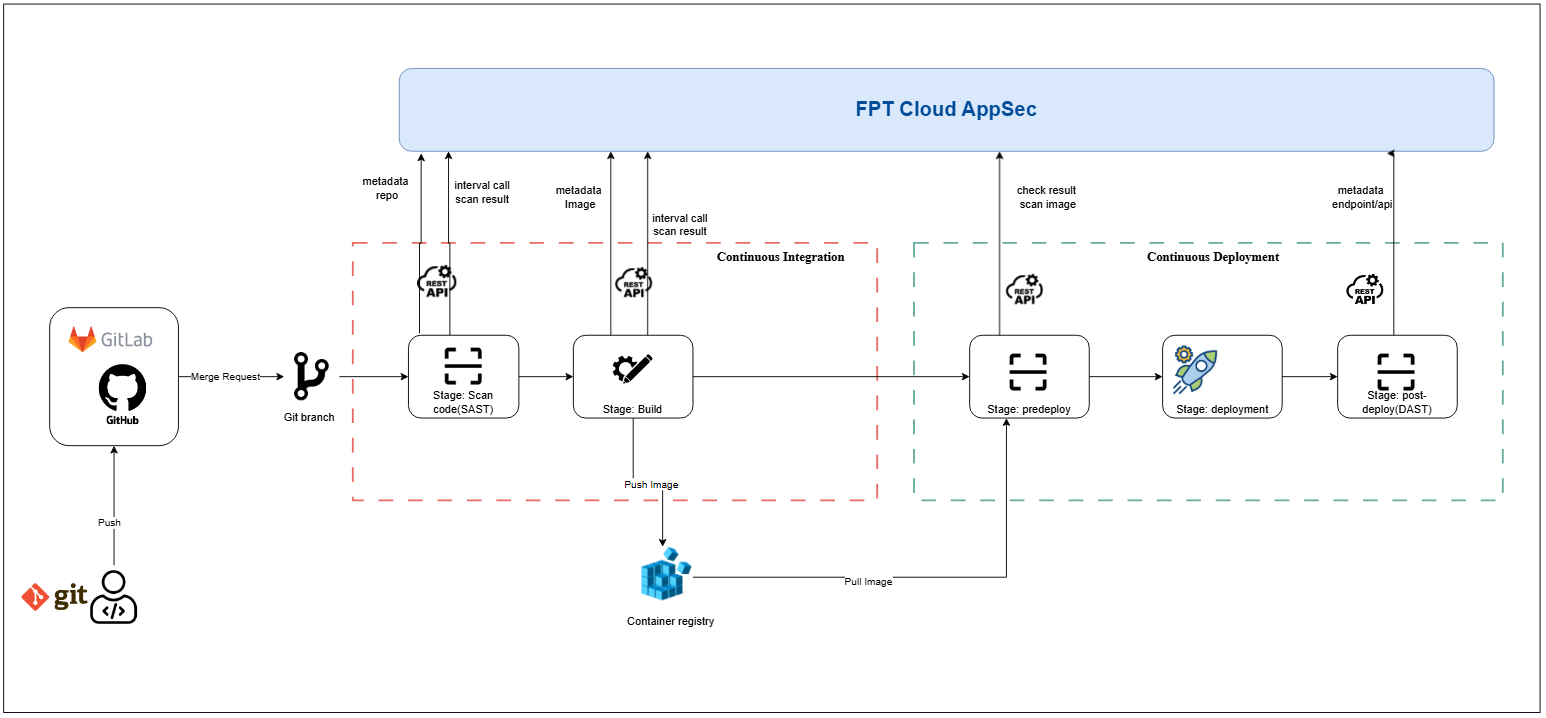
1. Overview
Automating security scan steps in a CI/CD pipeline helps detect vulnerabilities early. This guide covers:
- Prerequisites
- Authentication setup
- Pipeline integration steps for code scan, secret scan, and image scan
- Sample configurations (GitLab CI, Jenkins)
2. Prerequisites
- An active FSP Core Service account with a valid Orgid and access_key.
- Access to the API endpoints (e.g.,
/integration/scan-code,/integration/scan-secret,/integration/scan-imageand corresponding result endpoints). - A CI/CD runner or agent that can reach the FSP Core Service API.
- A Unix-like shell environment (bash, sh) for writing HTTP call scripts.
3. API specification
3.1. Code scan integration
3.1.1. Scan full source
POST /api/v1/xplat/fsp-service/core-service/integration/scan-code
Initiates a source code scan for a specific repository and commit.
Headers
| Name | Type | Required | Description |
|---|---|---|---|
| Orgid | string | No | Organization ID for authentication |
Body — Content-Type: application/json
| Name | Type | Required | Description |
|---|---|---|---|
| team_code | string | Yes | FSEC team code. See here |
| git_repo_url | string | Yes | Git repository URL |
| access_key | string | Yes | Access key issued by FSEC. See here |
| branch | string | Yes | Branch name to scan |
| commit | string | No | Commit SHA to scan |
Example
POST /api/v1/xplat/fsp-service/core-service/integration/scan-code HTTP/1.1
Host: api.yourdomain.com
Orgid: 123e4567-e89b-12d3-a456-426614174000
Content-Type: application/json

{
  "team_code": "FSEC_TEAM_001",
  "git_repo_url": "https://github.com/example/repo.git",
  "access_key": "abcd1234",
  "branch": "main"
}
Response — 200
{
  "data": {
    "errorCode": "F-000",
    "errorMessage": "",
    "data": { "request_code": "", "request_time": "2025-03-25 13:34:11" }
  }
}
3.1.2. Scan by commit
POST /api/v1/xplat/fsp-service/core-service/integration/scan-code?scan-mode=commit
Same as above but commit field is required.
3.2. Secret scan integration
3.2.1. Scan full source
POST /api/v1/xplat/fsp-service/core-service/integration/scan-secret
Same request/response structure as code scan.
3.2.2. Scan by commit
POST /api/v1/xplat/fsp-service/core-service/integration/scan-secret?scan-mode=commit
Same as above but commit is required.
3.3. Image scan integration
POST /api/v1/xplat/fsp-service/core-service/integration/scan-image
Body
| Name | Type | Required | Description |
|---|---|---|---|
| team_code | string | Yes | FSEC team code |
| access_key | string | Yes | Access key for the image registry |
| image_url | string | Yes | Registry path and tag (e.g., repo:tag) |
3.4. Get code scan result
POST /api/v1/xplat/fsp-service/core-service/integration/get-scan-code-result
Body
| Name | Type | Required | Description |
|---|---|---|---|
| request_code | string | Yes | Request code from /scan-code |
| access_key | string | Yes | Access key issued by FSEC |
3.5. Get secret scan result
POST /api/v1/xplat/fsp-service/core-service/integration/get-scan-secret-result
Same structure as get code scan result.
3.6. Get image scan result
POST /api/v1/xplat/fsp-service/core-service/integration/get-scan-image-result
Same structure as get code scan result.
4. Pipeline flow
4.1. Code scan stage (after checkout)
- Trigger:
POST .../integration/scan-code - Poll result:
POST .../integration/get-scan-code-resultuntilscan_result_status = SUCCESS - Pass/fail: Based on
scan_resultor your quality gates
4.2. Secret scan stage (after checkout)
- Trigger:
POST .../integration/scan-secret - Poll result:
POST .../integration/get-scan-secret-result - Pass/fail: Based on
scan_result
4.3. Image scan stage (after build)
- Trigger:
POST .../integration/scan-image - Poll result:
POST .../integration/get-scan-image-result - Pass/fail: Based on
scan_result
5. Sample configurations
5.1. GitLab CI
variables:
  ORGID: "$FSP_ORGID"
  ACCESS_KEY: "$FSP_ACCESS_KEY"
  API_URL: "https://api.yourdomain.com/api/v1/xplat/fsp-service/core-service"
  TEAM_CODE: "FSEC_TEAM_001"

stages:
  - code-scan
  - secret-scan
  - build
  - image-scan

.scan-stage: &scan-stage
  image: alpine:latest
  before_script:
    - apk add --no-cache curl jq
  script:
    - RESPONSE=$(curl -s -X POST "$API_URL/integration/${ENDPOINT}"
        -H "Orgid: $ORGID" -H "access_key: $ACCESS_KEY"
        -H "Content-Type: application/json"
        -d "{\"team_code\":\"$TEAM_CODE\",\"git_repo_url\":\"$CI_PROJECT_URL.git\",\"branch\":\"$CI_COMMIT_REF_NAME\",\"commit\":\"$CI_COMMIT_SHA\"}")
    - CODE=$(echo "$RESPONSE" | jq -r '.data.data.request_code')
    - |
      until [ "$(curl -s -X POST "$API_URL/integration/$RESULT_ENDPOINT"
            -H "Orgid: $ORGID" -H "access_key: $ACCESS_KEY"
            -H "Content-Type: application/json"
            -d "{\"request_code\":\"$CODE\",\"access_key\":\"$ACCESS_KEY\"}"
        | jq -r '.data.data.status')" = "COMPLETED" ]; do sleep 10; done
    - ISSUES=$(curl -s -X POST "$API_URL/integration/$RESULT_ENDPOINT"
        -H "Orgid: $ORGID" -H "access_key: $ACCESS_KEY"
        -H "Content-Type: application/json"
        -d "{\"request_code\":\"$CODE\",\"access_key\":\"$ACCESS_KEY\"}"
        | jq '.data.data.issues_found')
    - if [ "$ISSUES" -gt 0 ]; then echo "Found $ISSUES issues"; exit 1; fi

code-scan:
  stage: code-scan
  variables:
    ENDPOINT: "scan-code"
    RESULT_ENDPOINT: "get-scan-code-result"
  <<: *scan-stage

secret-scan:
  stage: secret-scan
  variables:
    ENDPOINT: "scan-secret"
    RESULT_ENDPOINT: "get-scan-secret-result"
  <<: *scan-stage
5.2. Jenkins Pipeline
pipeline {
  agent any
  environment {
    ORGID = credentials('FSP_ORGID')
    ACCESS_KEY = credentials('FSP_ACCESS_KEY')
    API_URL = 'https://api.yourdomain.com/api/v1/xplat/fsp-service/core-service'
  }
  stages {
    stage('Code Scan') {
      steps {
        script {
          def payload = [team_code: 'FSEC_TEAM_001', git_repo_url: env.GIT_URL,
                         branch: env.BRANCH_NAME, commit: env.GIT_COMMIT]
          def response = httpRequest acceptType: 'APPLICATION_JSON',
            contentType: 'APPLICATION_JSON', httpMode: 'POST',
            requestBody: groovy.json.JsonOutput.toJson(payload),
            url: "${API_URL}/integration/scan-code",
            customHeaders: [[name:'Orgid', value:ORGID], [name:'access_key', value:ACCESS_KEY]]
          def code = readJSON(text: response.content).data.data.request_code
          timeout(time: 5, unit: 'MINUTES') {
            waitUntil {
              def result = httpRequest acceptType: 'APPLICATION_JSON',
                contentType: 'APPLICATION_JSON', httpMode: 'POST',
                requestBody: groovy.json.JsonOutput.toJson([request_code: code, access_key: ACCESS_KEY]),
                url: "${API_URL}/integration/get-scan-code-result",
                customHeaders: [[name:'Orgid', value:ORGID], [name:'access_key', value:ACCESS_KEY]]
              return readJSON(text: result.content).data.data.status == 'COMPLETED'
            }
          }
        }
      }
    }
  }
}