Set Up Hyperparameters
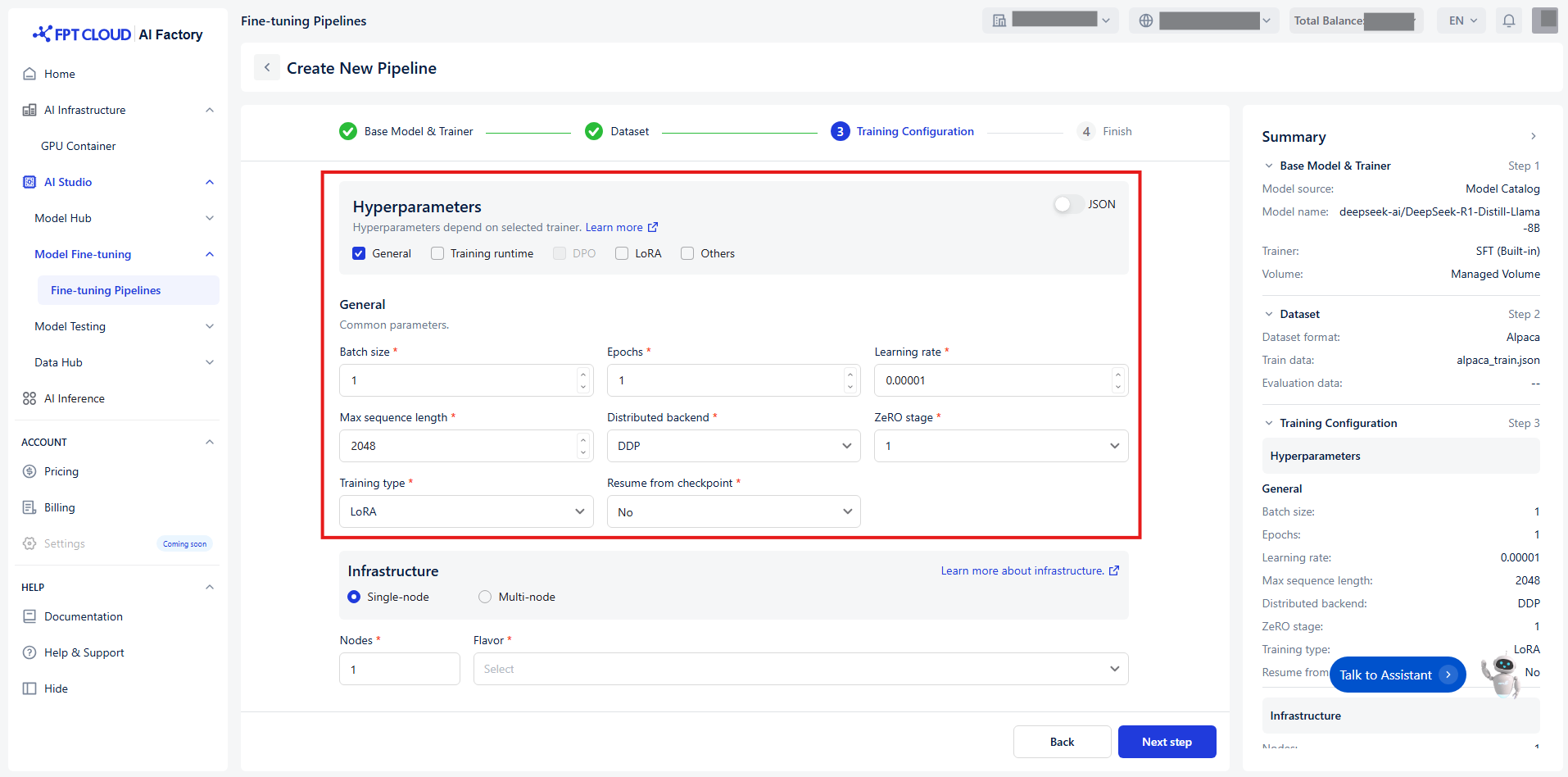
Hyperparameters control how the model’s weights are updated during the training process. To make configuration easier, we categorize hyperparameters into 5 distinct groups based on their function and relevance:
Group 1 - General
The core settings of your training process.
| Name | Description | Type | Supported value |
|---|---|---|---|
| Batch size | The number of examples the model processes in one forward and backward pass before updating its weight. Large batches slow down training, but may produce more stable results. | ||
| In case of distributed training, this is batch size on each device. | Int | [1, +∞) | |
| Epochs | An epoch is a single complete pass through your entire training data during model training. You will typically run multiple epochs so the model can iteratively refine its weights. | Int | [1, +∞) |
| Learning rate | Adjusts the size of changes made to the model’s learned parameters. | Float | (0, 1) |
| Max sequence length | Max input length, longer sequences will be cut off to this value. | Int | [1, +∞) |
| Distributed backend | Backend to use for distributed training. | Enum[string] | DDP, DeepSpeed |
| ZeRO stage | Stage to apply DeepSpeed ZeRO algorithm. Only apply when Distributed backend = DeepSpeed. | Enum[int] | 1, 2, 3 |
| Training type | Which parameter mode to use. | Enum[string] | Full, LoRA |
| Resume from checkpoint | Relative path of the checkpoint that the training engine will resume from. | Union[bool, string] | No, Last checkpoint, Path/to/checkpoint |
Group 2 - Training runtime
Optimize the efficiency and performance of your training.
| Name | Description | Type | Supported value |
|---|---|---|---|
| Gradient accumulation steps | Number of update steps to accumulate the gradients for, before performing a backward/update pass. | Int | [1, +∞) |
| Mixed precision | Type of mixed precision to use. | Enum[string] | Bf16, Fp16, None |
| Quantization bit | The number of bits to quantize the model using on-the-fly quantization. Currently only applicable when Training type = LoRA. | Enum[string] | None |
| Optimizer | Optimizer to use for training. | Enum[string] | Adamw, Sgd |
| Weight decay | Weight decay to apply to the optimizer. | Float | [0, +∞) |
| Max gradient norm | Maximum norm for gradient clipping. | Float | [0, +∞) |
| Disable gradient checkpointing | Whether or not to disable gradient checkpointing. | Bool | True, False |
| Flash attention v2 | Whether to use flash attention version 2. Currently only support false. | Bool | False |
| LR warmup steps | Number of steps used for a linear warmup from 0 to Learning rate. | Int | [0, +∞) |
| LR warmup ratio | Ratio of total training steps used for a linear warmup. | Float | [0, 1) |
| LR scheduler | Learning rate scheduler to use. | Enum[string] | Linear, Cosine, Constant |
| Full determinism | Ensure reproducible results in distributed training. Important: this will negatively impact the performance, so only use it for debugging. | ||
| If True, setting Seed will not take effect. | Bool | True, False | |
| Seed | Random seed for reproducibility. | Int | [0, +∞) |
Group 3 - DPO
Enable this group when using trainer = DPO.
| Name | Description | Type | Supported value |
|---|---|---|---|
| DPO label smoothing | The robust DPO label smoothing parameter in DPO should be between 0 and 0.5. | Float | [0, 0.5] |
| Preference beta | The beta parameter in the preference loss. | Float | [0, 1] |
| Preference fine-tuning mix | The SFT loss coefficient in DPO training. | Float | [0, 10] |
| Preference loss | The type of DPO loss to use. | Enum[string] | Sigmoid, Hinge, Ipo, Kto pair, Orpo, Simpo |
| SimPO gamma | The target reward margin in SimPO loss. Used only when applicable. | Float | (0, +∞) |
Group 4 - LoRA
Enable this group when using Training type = LoRA.
| Name | Description | Type | Supported value |
|---|---|---|---|
| Merge adapter | Whether or not to merge the LoRA adapter into the base model to provide the final model. If not, only the LoRA adapter will be saved after training is done. | Bool | True, False |
| LoRA alpha | Alpha parameter for LoRA. | Int | [1, +∞) |
| LoRA dropout | Dropout rate for LoRA. | Float | [0, 1] |
| LoRA rank | Rank of the LoRA matrices. | Int | [1, +∞) |
| Target modules | Target modules for quantization or fine-tuning. | String | All linear |
Group 5 - Others
Control how fine-tuning progress is tracked and saved.
| Name | Description | Type | Supported value |
|---|---|---|---|
| Checkpoint strategy | The checkpoint save strategy to adopt during training. | ||
| "best" only applicable when Evaluation strategy is not "no". | Enum[string] | No, Epoch, Steps | |
| Checkpoint steps | Number of training steps before two checkpoint saves if Checkpoint strategy = step. | Int | [1, +∞) |
| Evaluation strategy | The evaluation strategy to adopt during training. | Enum[string] | No, Epoch, Steps |
| Evaluation steps | Number of update steps between two evaluations if Evaluation strategy = steps. | ||
| Will default to the same value as Logging steps if not set. | Int | [1, +∞) | |
| No. of checkpoints | If a value is passed, it will limit the total amount of checkpoint. | Int | [1, +∞) |
| Save best checkpoint | Whether or not to track and keep the best checkpoint. Currently only supports False. | Bool | False |
| Logging steps | Number of steps between logging events including stdout logs and MLflow data points. | ||
| Logging steps = -1 means log on every step. | Int | [0, +∞) | |
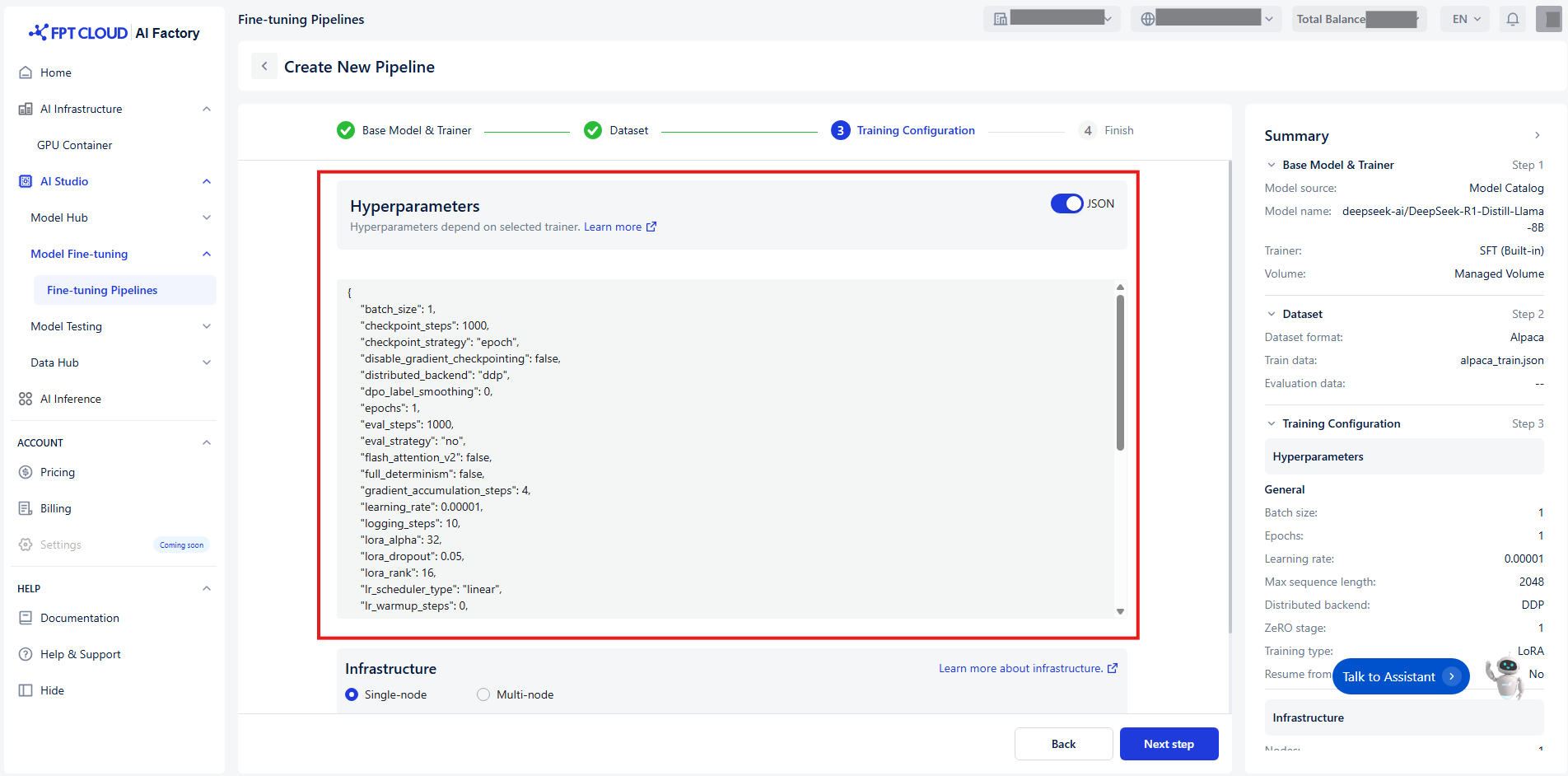
| Or you can set up quickly hyperparameters by switching toggle JSON : |