Deployment configuration
Go to AI Platform --> Model Serving --> Deployment --> Deployment Name --> Deployment Settings
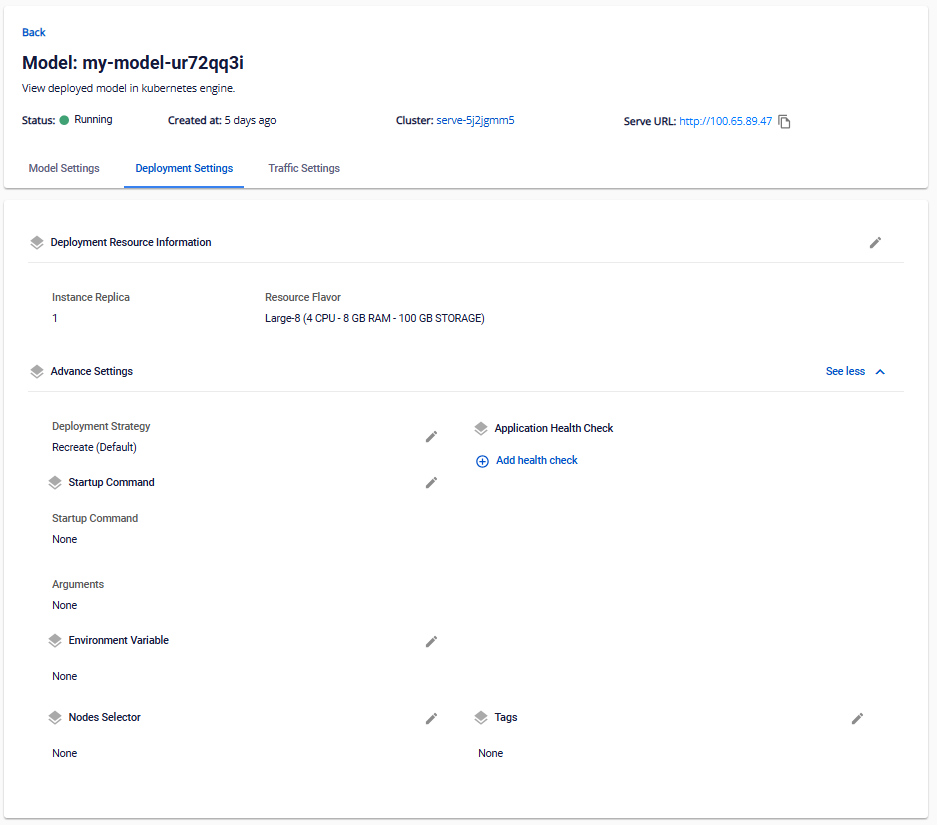
| Information | Description | Possible actions |
|---|---|---|
| Instance Replica | Number of Instances in Deployment | Edit increase/decrease instance |
| Resource Flavor | Preset configuration of CPU/RAM/DISK/GPU | Edit change Flavor |
| vCPU | Processor configuration (core) | Edit increase/decrease vCPU |
| RAM | Processor configuration (core) | Edit increase/decrease vCPU |
| GPU | Graphics processor configuration (piece) | Edit increase/decrease GPU |
| Storage Type | Storage capacity type | Edit change Storage type |
| Access Mode | Storage access type | Edit change access type |
| Mount Path | Path in Instance connecting to Storage | Edit change path connecting to Storage |
| Volume Capacity | Storage capacity (GB) | Edit increase/decrease storage capacity |
| Deployment Strategy | Deployment strategy (in K8S) | Edit change deployment strategy |
| Startup Command | Command to run when starting instance | Edit change launch command |
| Arguments | Instance startup arguments | Edit change launch arguments |
| Environment Variable | Environment variables assigned to the instance | Edit change environment variables |
| Nodes Selector | Configure the label Worker nodes/Worker group to deploy to | Edit change label |
| Application Health Check | Configure the application health check | Edit to change the health check configuration |
| Readiness Probe | Check if the instance is ready | Edit to change the health check configuration |
| Liveness Probe | Check if the instance is running | Edit to change the health check configuration |
| Startup Probe | Check if the instance has started | Edit to change the health check configuration |
| Protocol | Protocol used for status checks | Edit to change the health check configuration |
| Path | Path used for status checks | Edit to change the health check configuration |
| Port | Port used for status checks | Edit to change the health check configuration |
| Initial Delay Seconds | Initial delay (in seconds) before starting health check actions | Edit to change the health check configuration |
| Period Seconds | Frequency of probes in seconds. Default is 10 seconds. Minimum value is 1 | Edit to change the health check configuration |
| Timeout Seconds | Timeout duration (in seconds) for probe actions. Default is 1 second. Minimum value is 1 | Edit to change the health check configuration |
| Success Threshold | Number of consecutive successful probes after failure to consider it successful. Default is 1. Must be 1 for liveness. Minimum value is 1 | Edit to change the health check configuration |
| Failure Threshold | Number of consecutive failed probes before an action is triggered. For liveness, the container restarts; for readiness, the instance is marked Unready. Default is 3. Minimum value is 1 | Edit to change the health check configuration |
| HTTP Headers | Create HTTP headers in Key-Value format for health checks | Edit to change the health check configuration |
| Tags | Assign labels to the Deployment | Edit to add, edit, or delete labels assigned to the Deployment |
| Note : | ||
| Title | Description | |
| --- | --- | |
| Change Deployment Flavor | Currently, changing the deployment resource from Flavor to Custom is not supported. This feature will be developed later. | |
| Change Process | When information in the Deployment Setting is updated, the Instance will be redeployed according to the new configuration. |