VPN Connectionの作成
VPN Connectionを作成するには、以下の手順に従ってください。
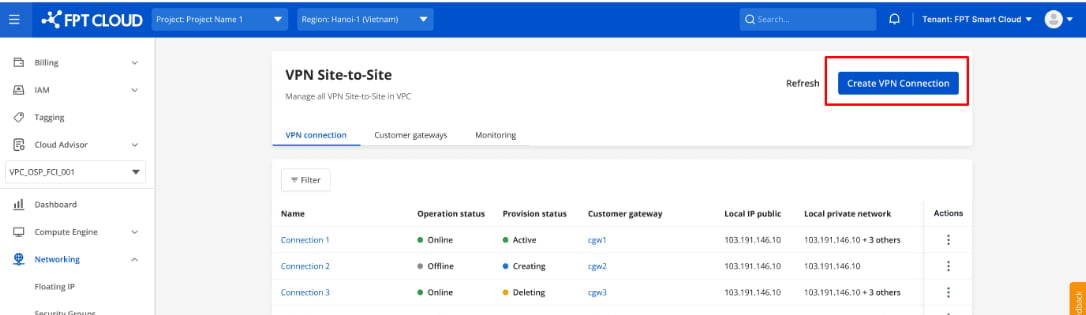
ステップ1: メニューから Network を選択し、VPN Site-to-Site タブを選択します。 ここでVPN Connectionを管理できます。Create VPN connection を選択してください。
ステップ2: VPN Gatewayを作成し、Nextをクリックします。 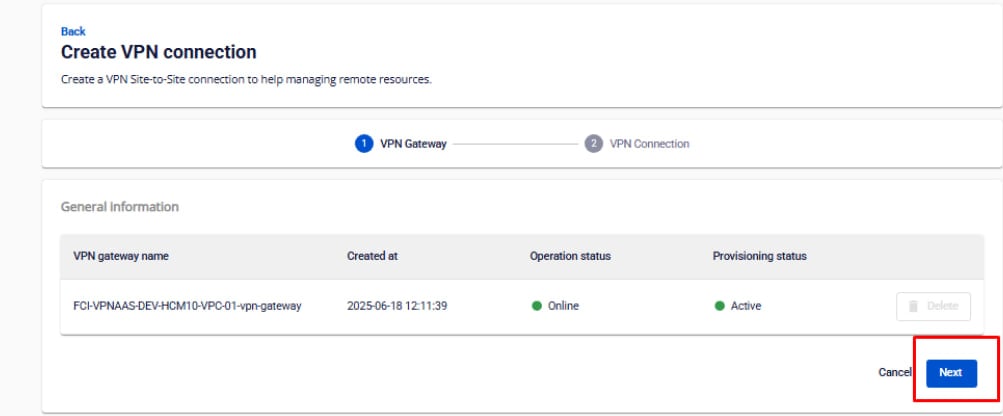
ステップ3: VPN Connectionを作成するための設定情報を入力します。 VPN Connectionのパラメーターには3つの主要セクションがあります:
- General Information(VPN接続の基本情報)
- Remote VPN Information(暗号化情報およびお客様情報)
- Dead Peer Detection(問題発生時に自動リトライする回数)
セクション1: General information
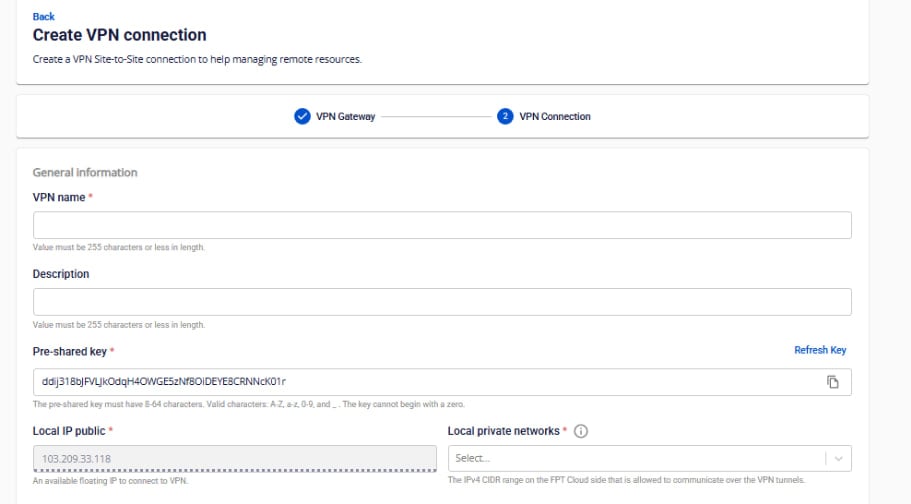
| フィールド | 説明 |
|---|---|
| VPN name | VPN Connectionの名前 |
| Description | VPN Connectionの説明 |
| Pre-shared key | 両デバイス間のセキュリティキー。Refresh Key をクリックして新しいキーを生成し、Copy をクリックしてコピーできます。 |
| Local IP public | FPT Cloudシステムから割り当てられたパブリックIP |
| Local private networks | FPT Cloud上のリソースネットワーク範囲 |
セクション2: Remote VPN Information
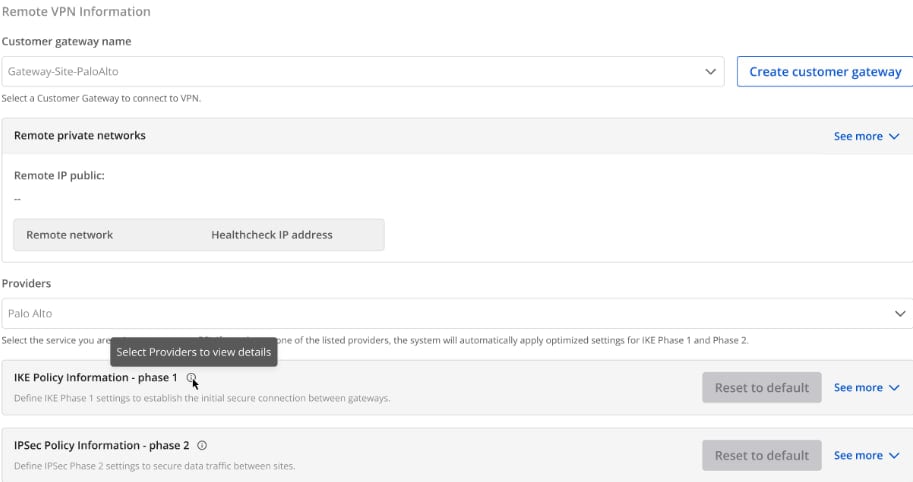
Customer gateway
| フィールド | 説明 |
|---|---|
| Customer gateway | |
| Customer gateway | 接続先のCustomer Gatewayを選択します。Customer Gatewayがない場合はこちら/を参照してください。 |
| Providers | FCIへのVPN接続プロバイダーのリスト |
| IKE Policy | |
| Authorization algorithm | VPN接続確立時にデータを認証するアルゴリズム。値: sha1, sha256, sha384, sha512, aes-xcbc。セキュリティとパフォーマンスのバランスには「sha256」を推奨します。 |
| Encryption algorithm | セキュリティキー交渉プロセスの暗号化。値: aes-128, aes-192, aes-256, aes-128-gcm-8, aes-128-gcm-12, aes-128-gcm-16, aes-192-gcm-8, aes-192-gcm-12, aes-192-gcm-16, aes-256-gcm-8, aes-256-gcm-12, aes-256-gcm-16。FCIはセキュリティとパフォーマンスのバランスに aes-256 を推奨します。ikev1 を使用する場合、gcmアルゴリズムは選択しないでください。 |
| IKE version | サポートするIKEバージョン。値: ikev1, ikev2。FCIはほとんどのファイアウォール機器に ikev2 を推奨します。古いCisco機器でikev1のみサポートの場合はikev1を選択してください。 |
| Lifetime units | IKE接続の存続期間の単位。デフォルト: second |
| Lifetime value | Phase 1の具体的なライフタイム値 |
| DH Group | 初期鍵交換に使用するDiffie-Hellmanグループ。値: group_1, group_2, group_5, group_14〜group_21 |
| Phase 1 negotiation mode | IKEのPhase 1でセキュア接続を確立する方式。値: main, aggressive(デフォルト: main) |
| IPSec Policy | |
| Authorization algorithm | データ認証アルゴリズム。値: sha1, sha256, sha384, sha512, aes-xcbc。「sha256」を推奨します。 |
| Encapsulation mode | データの暗号化とカプセル化のモード。デフォルト: tunnel |
| Encryption algorithm | VPN経由で転送される実際のデータの暗号化。値: aes-128, aes-192, aes-256。aes-256 を推奨します。 |
| Lifetime units | デフォルト: second |
| Lifetime value | IPSecセッションが再確立前に存続できる時間 |
| Perfect forward secrecy | セッションキーのセキュリティオプション(PFS)。値: off, group_1, group_2, group_5, group_14〜group_21。「group_14」を推奨します。 |
| Transform protocol | IPSecの暗号化・認証方式を定義するプロトコル。値: esp, ah |
Providersについて
- 現在FCIはAWS、Fortigate、Palo Altoなどのプロバイダーのプリセット設定をサポートしています。最適な接続のためにこれらのパラメーターを使用することを推奨します。
- 上記リスト以外のプロバイダーの場合は、Providers名、IKE、IPsecの情報を手動で入力してください。
各プロバイダーのプリセット設定:
| 設定パラメーター | AWS | Fortigate | Palo Alto |
|---|---|---|---|
| IKE Info | |||
| IKE version | ikev2 | ikev2 | ikev2 |
| Encryption algorithm | aes-256 | aes-256 | aes-256 |
| Authorization algorithm | sha256 | sha256 | sha256 |
| DH Group | group14 | group 19 | group 20 |
| Lifetime value | 28800s | 28800s | 28800s |
| Phase 1 negotiation mode | main | main | main |
| IPSec Info | |||
| Encryption algorithm | aes-256 | aes-256 | aes-256 |
| Authorization algorithm | sha256 | sha256 | sha256 |
| Perfect forward secrecy | group14 | group14(またはgroup19) | group 19 |
| Lifetime value | 3600s | 3600s | 3600s |
| Encapsulation mode | tunnel | tunnel | tunnel |
| Transform protocol | esp | esp | esp |
セクション3: Dead Peer Detection
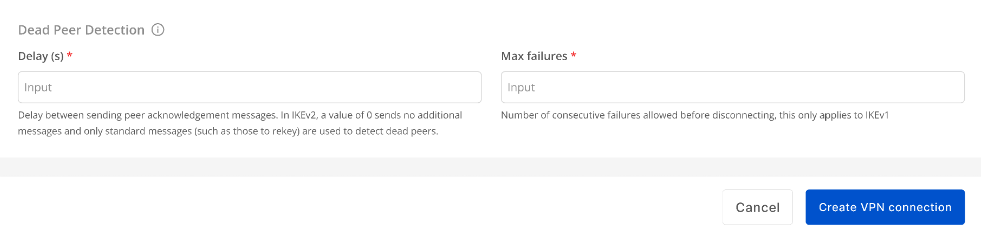
| フィールド | 説明 |
|---|---|
| Delay(s) | 接続確認のDPDプローブを送信する間隔(秒)。デフォルト: 30s |
| Max failures | 接続失敗と判定するまでの最大失敗回数。デフォルト: 10 |
すべての情報を入力したら、Create VPN Connection を選択してください。