Hpc Rest Machine
Reset machine
After starting the machine, you connect to it via a Remote Desktop Connection file – RDP file. However, during use you may encounter issues such as a black screen, inability to connect to the remote server, or the server becoming unresponsive. The recommended approach in this case is to wait 2–3 minutes and then reconnect. If the issue persists, you must reset the machine to continue using it.
To reset the machine, follow these steps:
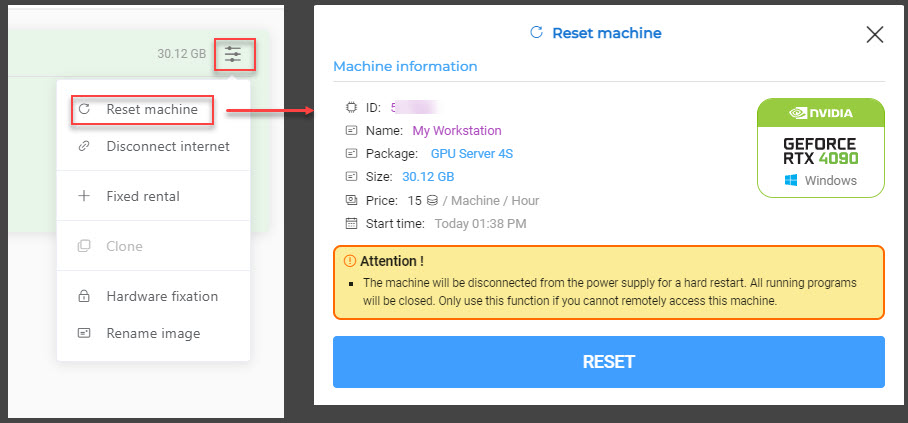
- On the Hosts screen in HPC Portal, select the image > Reset machine
A confirmation dialog will appear. Select Reset to proceed with restarting the machine.
- Wait a few minutes after the machine resets successfully, then download the RDP file again and reconnect to the machine.
– The Reset machine feature is equivalent to pressing the restart button on a physical server when the machine is unresponsive.
– This feature is useful when you are unable to remote into the machine immediately after it has booted successfully. If you still cannot reconnect after resetting the machine, please contact our administrator for immediate assistance.
– Consider carefully before using this feature during active use of the machine, as it may result in data loss.