Edit VPN connection
- From the menu, select Network, then go to the VPN Site-to-Site tab. Select Edit VPN Connection.
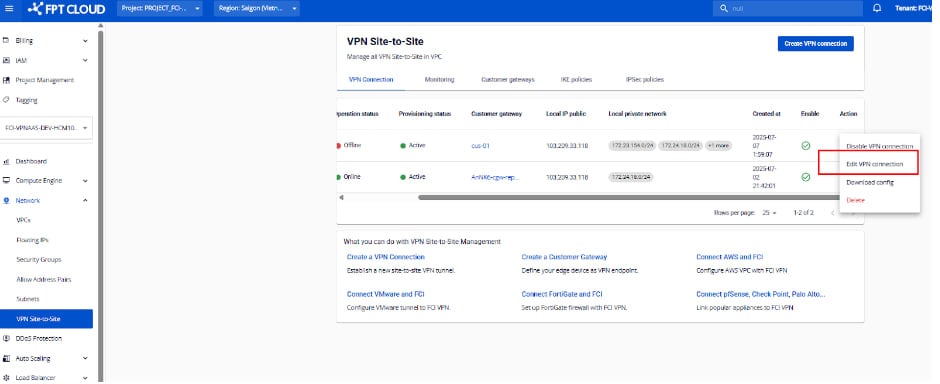
-
Edit the configuration details. Parameters are divided into three sections:
- General Information — basic connection details
- Remote VPN Information — encryption and customer-side configuration
- Dead Peer Detection — retry settings when connection issues occur
Section 1: General Information
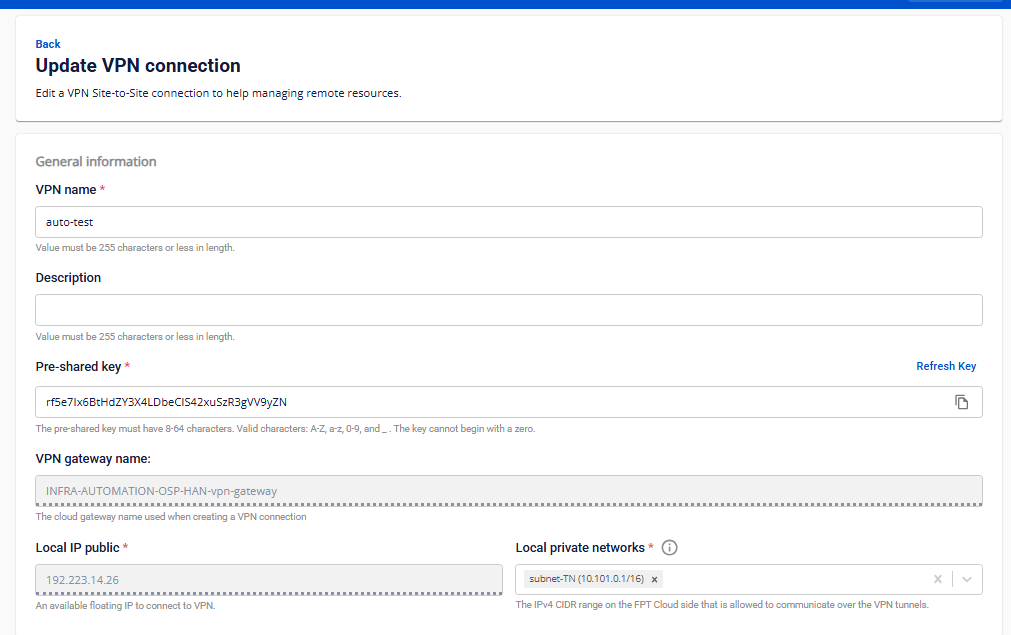
| Field | Description |
|---|---|
| VPN name | Name of the VPN connection. |
| Description | Description of the VPN connection. |
| Pre-shared key | The shared security key between the two devices. Click Refresh Key to generate a new key, or Copy to copy it. |
| Local IP public | Public IP address assigned by FPT Cloud. |
| Local private networks | Private network range of your resources within FPT Cloud. |
Section 2: Remote VPN Information
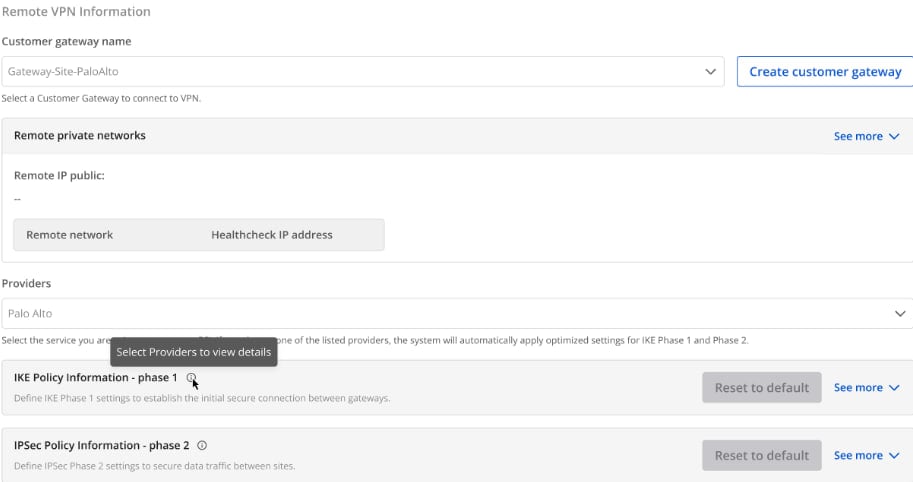
Customer gateway:
| Field | Description |
|---|---|
| Customer gateway | Remote endpoint configuration. Select the correct Customer Gateway to connect to. |
| Providers | List of VPN providers supported by FPT Cloud. |
IKE Policy:
| Field | Description |
|---|---|
| Authorization algorithm | Algorithm to authenticate data during VPN setup. Values: sha1, sha256, sha384, sha512, aes-xcbc. Recommended: sha256. |
| Encryption algorithm | Algorithm to encrypt the key exchange. Values include aes-128, aes-192, aes-256, and various GCM variants. Recommended: aes-128-gcm-12. |
| IKE version | Supported versions: ikev1, ikev2. |
| Lifetime units | Time unit for IKE lifetime. Default: second. |
| Lifetime value | Duration of the Phase 1 session. |
| DH Group | Diffie-Hellman group for key exchange. Values: group_1 through group_21. |
| Phase 1 negotiation mode | Values: main, aggressive. Default: main. |
IPSec Policy:
| Field | Description |
|---|---|
| Authorization algorithm | Algorithm to authenticate data during VPN operation. Values: sha1, sha256, sha384, sha512, aes-xcbc. Recommended: sha256. |
| Encapsulation mode | Mode for encrypting and encapsulating data. Default: tunnel. |
| Encryption algorithm | Algorithm to encrypt VPN traffic. Values: aes-128, aes-192, aes-256. Recommended: aes-256. |
| Lifetime units | Default: second. |
| Lifetime value | Duration of an IPSec session before re-establishment. |
| Perfect Forward Secrecy | PFS option paired with DH Group. Values: off, group_1 through group_21. Recommended: group_14. |
| Transform protocol | Protocol for encryption and authentication. Values: esp, ah. |
Provider presets:
FPT Cloud provides pre-configured settings for AWS, Fortigate, and Palo Alto. For other providers, enter IKE and IPSec parameters manually.
| Parameter | AWS | Fortigate | Palo Alto |
|---|---|---|---|
| IKE version | ikev2 | ikev2 | ikev2 |
| Encryption algorithm | aes-256 | aes-256 | aes-256 |
| Authorization algorithm | sha256 | sha256 | sha256 |
| DH Group | group14 | group14 – group19 | group14 – group20 |
| Lifetime value | 28800s | 28800s | 28800s |
| Phase 1 negotiation mode | main | main | main |
| IPSec Encryption algorithm | aes-256 | aes-256 | aes-256 |
| IPSec Authorization algorithm | sha256 | sha256 | sha256 |
| Perfect Forward Secrecy | group14 | group14 (or group19) | group19 |
| IPSec Lifetime value | 3600s | 3600s | 3600s |
| Encapsulation mode | tunnel | tunnel | tunnel |
| Transform protocol | esp | esp | esp |
Section 3: Dead Peer Detection
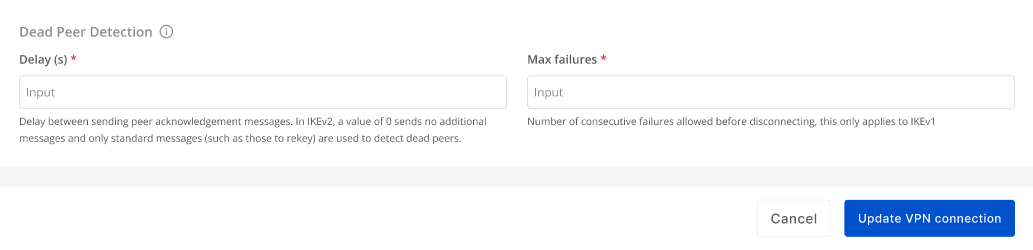
| Field | Description |
|---|---|
| Delay (s) | Time interval between DPD probes. Default: 30s. |
| Max failures | Maximum failed attempts before the peer is considered dead and the connection is reset. Default: 10. |
- Click Update VPN Connection to save changes, or Cancel to discard.