VyOS 1.5の接続
このガイドでは、FPT Smart CloudのVPN Site-to-SiteサービスにVPN S2S接続するルーターデバイスの構築方法を説明します。
- ステップ1: クラウド向けVyOS 1.5の構築
- ステップ2: VPN Site-to-Siteの設定
- ステップ3: VyOSの設定
事前に以下の条件を満たしていることを確認してください。
- ポータル上でVPNaaSが設定済みであること
- Vyos 1.5 という名前のイメージからダウンロードおよびブートされたVyOS 1.5
- パブリックIP(簡略化のためFloating IPを使用せず、VMに直接割り当て)
- デバッグ用のPfSense VM(任意)
ステップ1: クラウド向けVyOS 1.5の構築
- Horizonで、ユーザーのキーペアと任意のプロバイダーネットワーク {
IP PUBLIC} を使用してイメージからVMを作成します。
ステップ2: VPN Site-to-Siteの設定
https://console.fptcloud.com/ にアクセスしてVPN Site-to-Site接続を作成します。
-
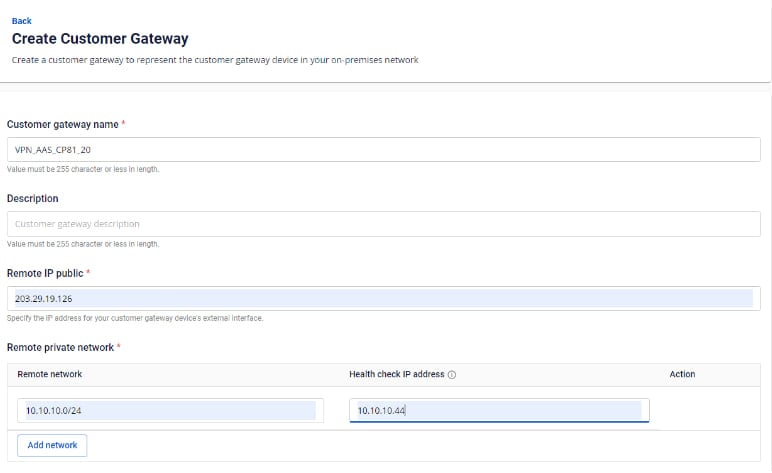
Customer Gatewayを作成します。
- Remote private network: VyOS側からピアリングするLANサブネットの範囲
- Remote IP public: VyOSのパブリックIP
-
Customer Gatewayを作成します。
-
VPN Connectionを作成します。 VPN Connectionのパラメーターは3つの主要セクションで構成されます。
- General information(接続の基本情報)
- Remote VPN Information(暗号化設定およびお客様側情報)
- Dead Peer Detection(接続問題発生時の自動リトライ回数)
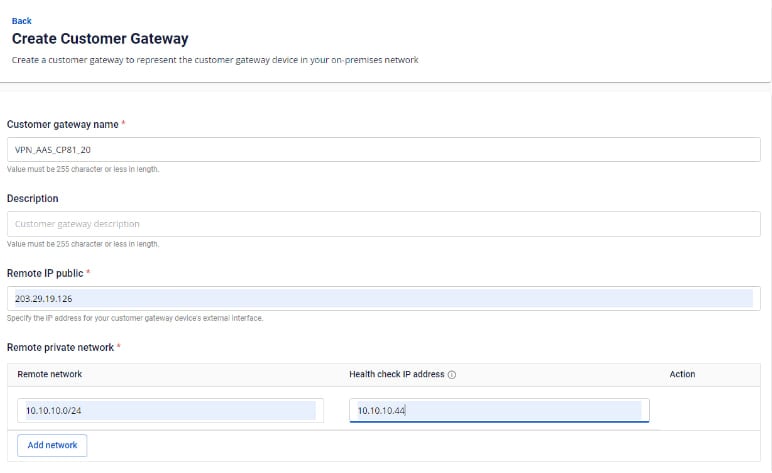
セクション1: General information 注意: Pre-shared keyの値を保存しておいてください — VyOSとの接続に必要です。
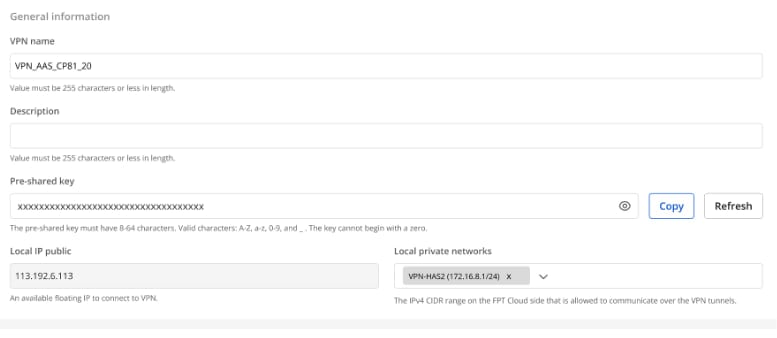
セクション2: Remote VPN information
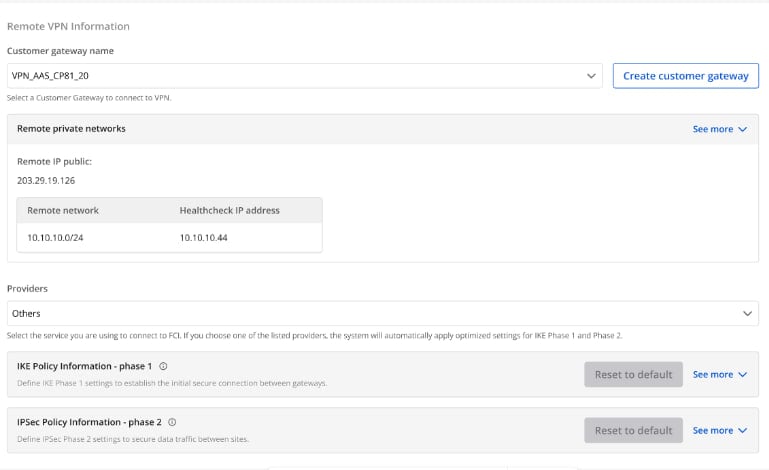
Providers = "others" を選択し、以下の手順に従ってください。
- ステップ1: providers name = "Vyos" を入力します。
- ステップ2: IKEおよびIPSecの設定を以下のとおり入力します。
IKEの設定:
- Authorization algorithm: sha256
- Encryption algorithm: aes 256
- IKE version: ikev2
- DH group: group14
- Lifetime: 3600 seconds
- Phase 1 negotiation mode: main
IPSecの設定:
- Authorization algorithm: sha256
- Encryption algorithm: aes 256
- Encapsulation mode: tunnel
- Transform protocol: esp
- Perfect Forward Secrecy (PFS): group14
- Lifetime: 3600 seconds
セクション3: Dead Peer Detection
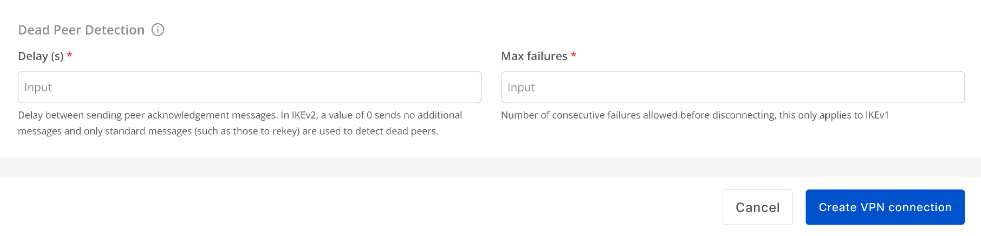
DelayとMax failureの値を入力し、Create VPN Connection を選択します。
ステップ3: VyOSの設定
- 上記で作成したキーを使用してVyOSにSSH接続します。
- ユーザー「vyos」でIPアドレス {
IP PUBLIC} にSSH接続します。例: ssh vyos@{IP PUBLIC}
以下のコマンドを実行します(パラメーターは実際の値に置き換えてください)。
Copyconfigure
Copyset interfaces ethernet eth0 address '{`IP Public Vyos`}'
set interfaces ethernet eth1 vif 111 address '{`IP LAN Vyos`}/24'
set protocols static route 0.0.0.0/0 next-hop {`IP-Remote`}
set vpn ipsec authentication psk RIGHT id '{`IP Public Vyos`}'
set vpn ipsec authentication psk RIGHT id {`IP-Remote`}
set vpn ipsec authentication psk RIGHT secret ' {`Pre-Share-Key`}'
set vpn ipsec esp-group ESP-GROUP mode 'tunnel'
set vpn ipsec esp-group ESP-GROUP proposal 1 encryption 'aes256'
set vpn ipsec esp-group ESP-GROUP proposal 1 hash 'sha256'
set vpn ipsec ike-group IKE-GROUP key-exchange 'ikev2'
set vpn ipsec ike-group IKE-GROUP proposal 1 dh-group '14'
set vpn ipsec ike-group IKE-GROUP proposal 1 encryption 'aes256'
set vpn ipsec ike-group IKE-GROUP proposal 1 hash 'sha256'
set vpn ipsec interface 'eth0'
set vpn ipsec site-to-site peer RIGHT authentication mode 'pre-shared-secret'
set vpn ipsec site-to-site peer RIGHT connection-type 'initiate'
set vpn ipsec site-to-site peer RIGHT default-esp-group 'ESP-GROUP'
set vpn ipsec site-to-site peer RIGHT ike-group 'IKE-GROUP'
set vpn ipsec site-to-site peer RIGHT local-address '{`IP Public Vyos`}'
set vpn ipsec site-to-site peer RIGHT remote-address {`IP-Remote`}
set vpn ipsec site-to-site peer RIGHT tunnel 0 local prefix '{`Sunet LAN Vyos`}/24'
set vpn ipsec site-to-site peer RIGHT tunnel 0 remote prefix '{`Sunet LAN Remote`}/24'
設定を保存してコミットします。
Copycommit
save