Detailed Guide to Using Auto Upgrade
- Managed Kubernetes Clusters running a version that is more than one minor version past end of standard support (relative to the oldest version supported by FPT Cloud) cannot use the auto upgrade version feature. Users must manually upgrade these clusters.
- For example, if a cluster is running version 1.24.14 and FPT Cloud supports Kubernetes versions from 1.26 to 1.29, this cluster cannot use the auto upgrade feature. To use it, the cluster must first be manually upgraded to version 1.25.
- The version upgrade mechanism follows the Rolling Update process. Workers running the new minor version are simultaneously created across all worker groups. Once these workers are in a Ready state and ready to run workloads, Kubernetes drains the workers running the old minor version. After draining completes, the old workers are deleted. This process repeats until all workers in the group are replaced.
1. Creating a Managed Kubernetes Cluster
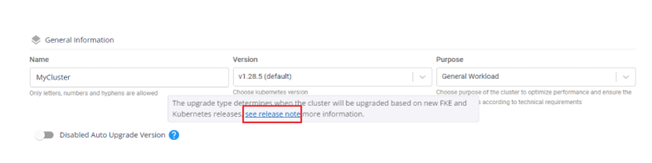
When creating a new Managed Kubernetes Cluster, the Auto Upgrade Version feature is disabled by default as shown below:
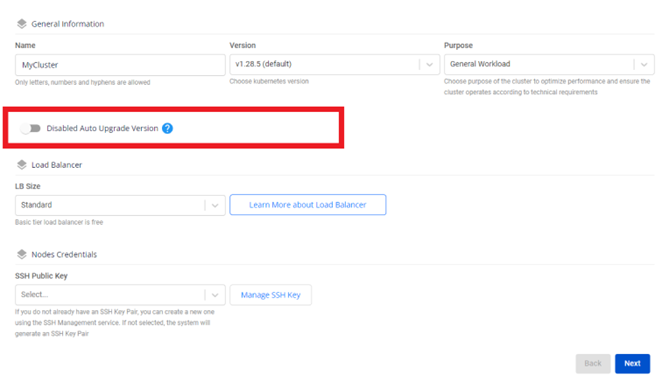
To view detailed information about the important milestones for a Kubernetes version supported by FPT Cloud, click the "?" icon.
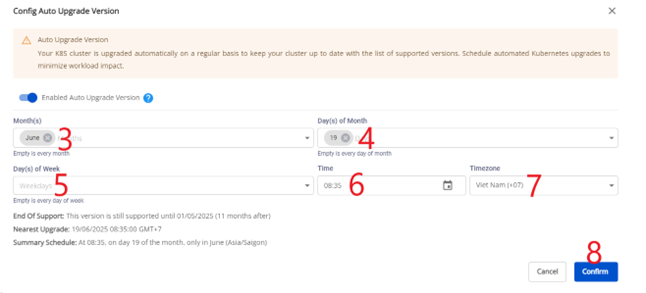
If you enable Auto Upgrade Version without configuring an upgrade time, the default upgrade time is 07:00 GMT+7 on the first day when that version reaches end of standard support.
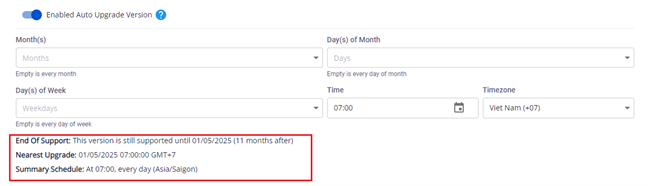
After configuring the auto upgrade schedule, you can view when the current version will reach end of support, the nearest upcoming auto upgrade time, and a summary of the auto upgrade schedule.
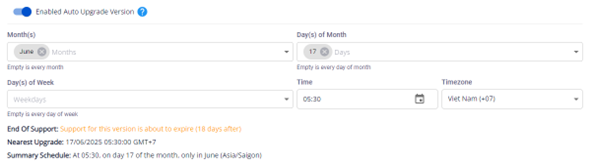
After completing the auto upgrade version schedule configuration during cluster creation, click Next to proceed to the Nodes Pool configuration step.
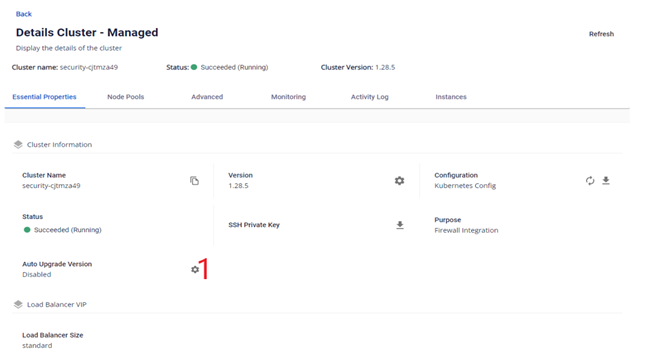
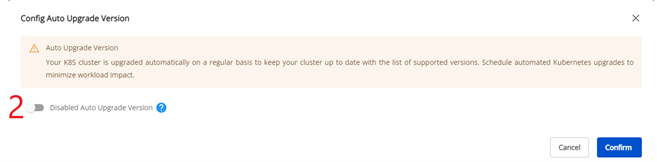
2. Changing Auto Upgrade Version configuration for existing clusters
Notes:
-
For existing Managed Kubernetes Clusters configured with auto upgrade version, users can still manually upgrade the version in the normal way, just like clusters without this feature enabled.
-
To cancel the auto upgrade schedule for a Managed Kubernetes Cluster, the user must disable the auto upgrade feature or change the auto upgrade schedule before 01:00 GMT+7 on the day FPT Cloud will automatically upgrade the version. For example: if cluster A has auto upgrade version enabled and is scheduled to automatically upgrade at 04:00 GMT+7 on June 25, 2024, the auto upgrade must be disabled or the schedule changed before 01:00 GMT+7 on June 25, 2024. Any changes after this time will have no effect and the automatic version upgrade will still proceed at 04:00 GMT+7 on June 25, 2024.
- Enable the auto upgrade feature: