Log in to FPT Cloud Jenkins CI
To log in to the Jenkins instance, use the username and password created on the Portal:
Step 1: In the FPT Portal menu > DevOps > Jenkins CI > click the Instance Name to view cluster details.
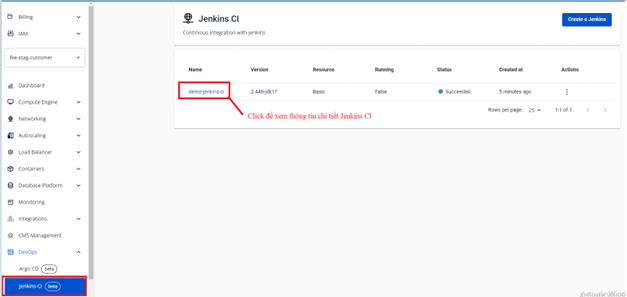
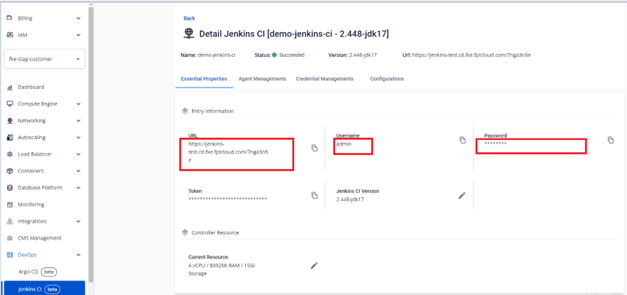
On the first screen, you will see the connection details for the Jenkins CI instance, including the URL and login credentials.
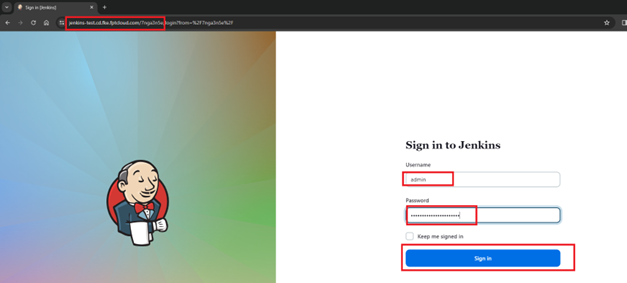
Step 2: Log in to the Jenkins instance.
On the Essential Properties screen, copy the URL and open the application:
- URL: From the Essential Properties screen.
- Username: Copied from the Essential Properties screen.
- Password: Copied from the Essential Properties screen.
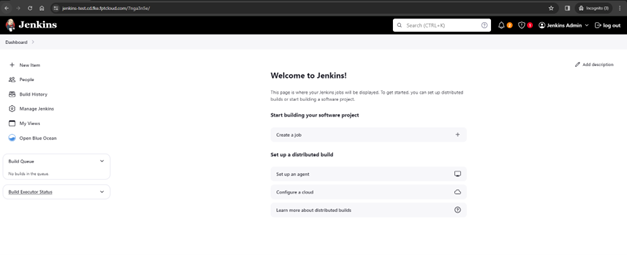
Interface after successfully logging in:
note
If you change the admin username or password directly in Jenkins, the credentials shown on the Portal will no longer be valid for authentication.