Modifying a GPU worker group
Prerequisites:
- CPU, GPU, RAM, Storage, and Instance quota sufficient for the desired worker group configuration change.
- GPU quota must cover at least Min nodes + 1 to allow worker nodes to roll out the new configuration. If using Autoscale, the GPU quota must cover the maximum desired number of nodes.
- One network subnet: the network used for Kubernetes nodes must have a Static IP Pool.
The steps are as follows:
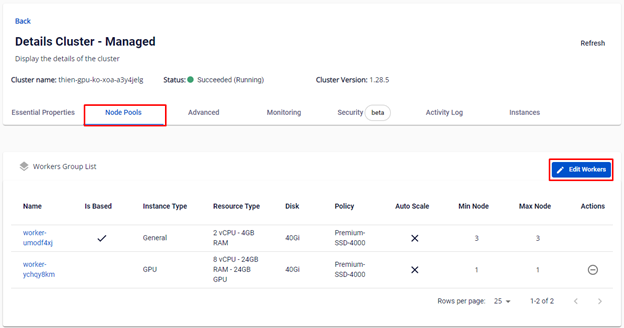
Step 1: Access the FPT Cloud portal at console.fptcloud.com, navigate to the Kubernetes section, click the cluster you want to modify, go to Node Pools, and click the "Edit Workers" icon.
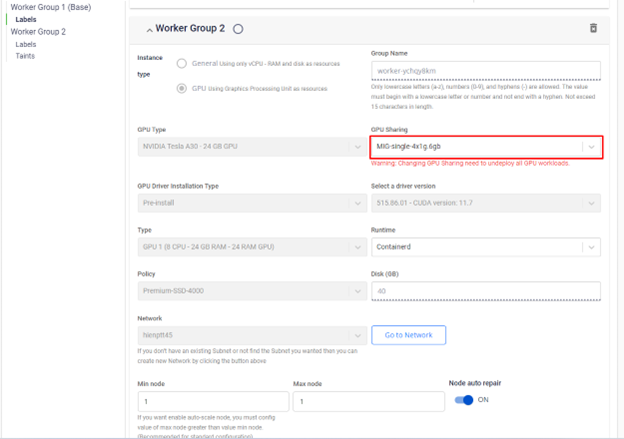
Step 2: In addition to the standard worker group configuration settings, configure the GPU options:
- Select instance type: GPU
- Select GPU type (A30, A100, H100, H200, etc.)
- Select the GPU sharing configuration (None / Single / Mixed)
- Select the GPU type configuration (CPU / RAM / GPU RAM)
warning
- Changing the GPU sharing method will require all GPU-related workloads to be redeployed. Before making the change, scale the application down to 0 to avoid errors.
- If the previous GPU sharing selection was None or None with Operator, you cannot change it to Single or Mixed.
- If the previous GPU sharing selection was Single, you can only change it to the corresponding Single modes.
Step 3: Review the initialization information and click Save.
Step 4: Monitor the status of the worker group update in the Kubernetes cluster. Once the status is Succeeded (Running), proceed to deploy your applications.