Deploying GPU applications on Kubernetes
Kubernetes manages and uses GPU resources similarly to CPU resources. Declare GPU resources for your application based on the GPU configuration selected for the worker group.
Notes:
- You can specify GPU limits without specifying requests because Kubernetes uses limits as the default request value.
- You can specify both GPU limits and requests, but the two values must be equal.
- You cannot specify GPU requests without specifying limits.
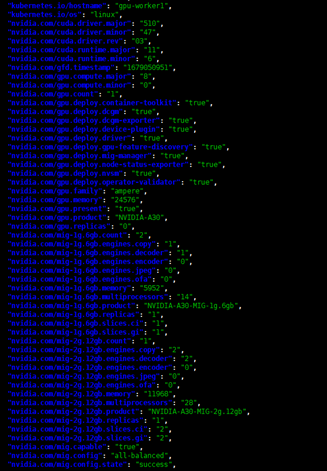
Check the GPU configuration with the following command:
kubectl get node -o json | jq '.items[].metadata.labels'
Example: The image below shows a worker using an NVIDIA A30 card with strategy: all-balanced and status: success.
Deployment examples
1. MIG sharing mode with single strategy
GPU resources are declared as follows:
nvidia.com/gpu: <number>

nvidia.com/gpu: 1
Example deployment using GPU single strategy:
apiVersion: apps/v1

kind: Deployment

metadata:

  name: example-gpu-app

spec:

  replicas: 1

  selector:

    matchLabels:

      component: gpu-app

  template:

    metadata:

      labels:

        component: gpu-app

    spec:

      containers:

        - name: gpu-container

          securityContext:

            capabilities:

              add:

                - SYS_ADMIN

          resources:

            limits:

              nvidia.com/gpu: 1

          image: nvidia/samples:dcgmproftester-2.0.10-cuda11.0-ubuntu18.04

          command: ["/bin/sh", "-c"]

          args:

            - while true; do /usr/bin/dcgmproftester11 --no-dcgm-validation -t 1004 -d 300; sleep 30; done
2. MIG sharing mode with mixed strategy
GPU resources are declared as follows:
nvidia.com/<mig-profile>: <number>

nvidia.com/mig-1g.6gb: 2
Example deployment using GPU mixed strategy:
apiVersion: apps/v1

kind: Deployment

metadata:

  name: example-gpu-app

spec:

  replicas: 1

  selector:

    matchLabels:

      component: gpu-app

  template:

    metadata:

      labels:

        component: gpu-app

    spec:

      containers:

        - name: gpu-container

          securityContext:

            capabilities:

              add:

                - SYS_ADMIN

          resources:

            limits:

              nvidia.com/mig-1g.6gb: 1

          image: nvidia/samples:dcgmproftester-2.0.10-cuda11.0-ubuntu18.04

          command: ["/bin/sh", "-c"]

          args:

            - while true; do /usr/bin/dcgmproftester11 --no-dcgm-validation -t 1004 -d 300; sleep 30; done
3. None strategy
GPU resources are declared as follows:
nvidia.com/gpu: 1
Example deployment using GPU none strategy:
apiVersion: apps/v1

kind: Deployment

metadata:

  name: example-gpu-app

spec:

  replicas: 1

  selector:

    matchLabels:

      component: gpu-app

  template:

    metadata:

      labels:

        component: gpu-app

    spec:

      containers:

        - name: gpu-container

          securityContext:

            capabilities:

              add:

                - SYS_ADMIN

          resources:

            limits:

              nvidia.com/gpu: 1

          image: nvidia/samples:dcgmproftester-2.0.10-cuda11.0-ubuntu18.04

          command: ["/bin/sh", "-c"]

          args:

            - while true; do /usr/bin/dcgmproftester11 --no-dcgm-validation -t 1004 -d 300; sleep 30; done
4. MPS sharing mode
GPU resources are declared as follows:
nvidia.com/gpu: <number>

nvidia.com/gpu: 1
Note: The maximum nvidia.com/gpu resource a pod can request is 1.