Configuring auto scale using KEDA and Prometheus
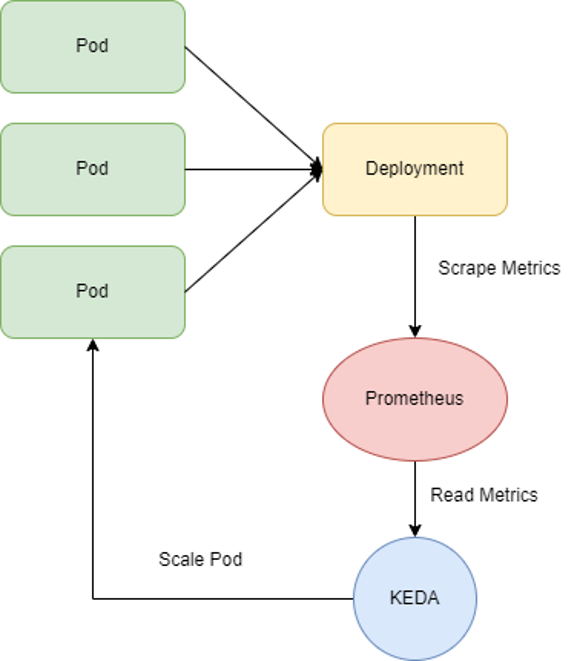
Prerequisites
- A Kubernetes cluster with GPU attached
- A GPU application currently in the running state
- The kube-prometheus-stack and prometheus-adapter packages already installed via the FPT App Catalog service, as described in Configuring auto scale for FPT Kubernetes Engine GPU using GPU custom metrics
Configuration steps
Step 1: Install KEDA
Option 1: Using FPT App Catalog
Select the FPT Cloud App Catalog service, then search for KEDA in the fptcloud-catalogs repository.
Option 2: Using Helm chart
helm repo add kedacore https://kedacore.github.io/charts
helm repo update
helm install keda kedacore/keda --namespace keda --create-namespace
Check that the KEDA pods are running normally:
kubectl -n keda get pod
NAME                                                   READY   STATUS    RESTARTS   AGE
pod/keda-admission-webhooks-54764ff7d5-l4tks           1/1     Running   0          3d
pod/keda-operator-567cb596fd-wx4t8                     1/1     Running   0          2d23h
pod/keda-operator-metrics-apiserver-6475bf5fff-8x8bw   1/1     Running   0          2d14h

NAME                                      TYPE        CLUSTER-IP       EXTERNAL-IP   PORT(S)            AGE
service/keda-admission-webhooks           ClusterIP   100.71.2.54              443/TCP            3d2h
service/keda-operator                     ClusterIP   100.66.228.223           9666/TCP           3d2h
service/keda-operator-metrics-apiserver   ClusterIP   100.71.162.181           443/TCP,8080/TCP   3d2h

NAME                                              READY   UP-TO-DATE   AVAILABLE   AGE
deployment.apps/keda-admission-webhooks           1/1     1            1           3d2h
deployment.apps/keda-operator                     1/1     1            1           3d2h
deployment.apps/keda-operator-metrics-apiserver   1/1     1            1           3d2h

NAME                                                         DESIRED   CURRENT   READY   AGE
replicaset.apps/keda-admission-webhooks-54764ff7d5           1         1         1       3d2h
replicaset.apps/keda-operator-567cb596fd                     1         1         1       3d2h
replicaset.apps/keda-operator-metrics-apiserver-6475bf5fff   1         1         1       3d2h
Step 2: Verify that Prometheus has GPU metrics
kubectl get --raw /apis/custom.metrics.k8s.io/v1beta1 | jq -r . | grep DCGM
"name": "namespaces/DCGM_FI_DEV_POWER_USAGE",
"name": "namespaces/DCGM_FI_DEV_FB_USED",
"name": "namespaces/DCGM_FI_DEV_PCIE_REPLAY_COUNTER",
"name": "pods/DCGM_FI_DEV_XID_ERRORS",
"name": "namespaces/DCGM_FI_PROF_GR_ENGINE_ACTIVE",
"name": "namespaces/DCGM_FI_DEV_TOTAL_ENERGY_CONSUMPTION",
"name": "pods/DCGM_FI_PROF_DRAM_ACTIVE",
"name": "jobs.batch/DCGM_FI_DEV_POWER_USAGE",
"name": "jobs.batch/DCGM_FI_DEV_SM_CLOCK",
"name": "namespaces/DCGM_FI_DEV_NVLINK_BANDWIDTH_TOTAL",
"name": "pods/DCGM_FI_DEV_POWER_USAGE",
"name": "jobs.batch/DCGM_FI_DEV_MEM_CLOCK",
"name": "jobs.batch/DCGM_FI_DEV_FB_USED",
"name": "namespaces/DCGM_FI_DEV_FB_FREE",
"name": "jobs.batch/DCGM_FI_PROF_GR_ENGINE_ACTIVE",
"name": "pods/DCGM_FI_DEV_MEMORY_TEMP",
"name": "pods/DCGM_FI_DEV_FB_FREE",
"name": "pods/DCGM_FI_DEV_MEM_CLOCK",
"name": "pods/DCGM_FI_PROF_GR_ENGINE_ACTIVE",
"name": "pods/DCGM_FI_DEV_NVLINK_BANDWIDTH_TOTAL",
"name": "pods/DCGM_FI_PROF_PIPE_TENSOR_ACTIVE",
"name": "jobs.batch/DCGM_FI_DEV_MEMORY_TEMP",
"name": "namespaces/DCGM_FI_DEV_MEM_CLOCK",
"name": "jobs.batch/DCGM_FI_DEV_XID_ERRORS",
"name": "namespaces/DCGM_FI_DEV_VGPU_LICENSE_STATUS",
"name": "jobs.batch/DCGM_FI_DEV_VGPU_LICENSE_STATUS",
"name": "pods/DCGM_FI_DEV_GPU_TEMP",
"name": "jobs.batch/DCGM_FI_PROF_PIPE_TENSOR_ACTIVE",
"name": "pods/DCGM_FI_DEV_PCIE_REPLAY_COUNTER",
"name": "pods/DCGM_FI_DEV_TOTAL_ENERGY_CONSUMPTION",
"name": "jobs.batch/DCGM_FI_DEV_TOTAL_ENERGY_CONSUMPTION",
"name": "pods/DCGM_FI_DEV_FB_USED",
"name": "pods/DCGM_FI_DEV_VGPU_LICENSE_STATUS",
"name": "namespaces/DCGM_FI_DEV_MEMORY_TEMP",
"name": "jobs.batch/DCGM_FI_DEV_NVLINK_BANDWIDTH_TOTAL",
"name": "namespaces/DCGM_FI_DEV_SM_CLOCK",
"name": "namespaces/DCGM_FI_PROF_PIPE_TENSOR_ACTIVE",
"name": "namespaces/DCGM_FI_DEV_GPU_TEMP",
"name": "jobs.batch/DCGM_FI_DEV_GPU_TEMP",
"name": "namespaces/DCGM_FI_PROF_DRAM_ACTIVE",
"name": "namespaces/DCGM_FI_DEV_XID_ERRORS",
"name": "jobs.batch/DCGM_FI_DEV_FB_FREE",
"name": "pods/DCGM_FI_DEV_SM_CLOCK",
"name": "jobs.batch/DCGM_FI_DEV_PCIE_REPLAY_COUNTER",
"name": "jobs.batch/DCGM_FI_PROF_DRAM_ACTIVE",
Step 3: Create a ScaledObject to define autoscaling for the application
Manifest example:
apiVersion: keda.sh/v1alpha1
kind: ScaledObject
metadata:
  name: scaled-object
spec:
  scaleTargetRef:
    name: gpu-test
  triggers:
    - type: prometheus
      metadata:
        serverAddress: http://prometheus-kube-prometheus-prometheus.prometheus.svc.cluster.local:9090
        metricName: engine_active
        query: sum(DCGM_FI_PROF_GR_ENGINE_ACTIVE{modelName="NVIDIA A30", container="gpu-test"}) / count(DCGM_FI_PROF_GR_ENGINE_ACTIVE{modelName="NVIDIA A30", container="gpu-test"})
        threshold: '0.8'
- name: The name of the GPU Deployment — in this example
gpu-test. - serverAddress: The Prometheus server endpoint — in this example
http://prometheus-kube-prometheus-prometheus.prometheus.svc.cluster.local:9090. - query: The PromQL expression used to determine the autoscaling value — in this example the average of
DCGM_FI_PROF_GR_ENGINE_ACTIVE. - threshold: The threshold value that triggers autoscaling — in this example
0.8.
As shown above, whenever the average value of DCGM_FI_PROF_GR_ENGINE_ACTIVE exceeds 0.8, the ScaledObject will scale the pods of the Deployment named gpu-test.
After creating the ScaledObject, the deployment will automatically scale to 0, confirming that the configuration was successful.