Subnet management
A subnet is a range of IP addresses subdivided from a VPC (Virtual Private Cloud). In a cloud environment, subnets are used to segment IP address space and control network traffic within the system, and serve as the foundation for routing, security, and service provisioning.
For DBaaS, Subnet plays an important role in:
- Defining network placement for database instances and related components (e.g., Floating IP).
- Controlling internal network access and declaring firewall/Security Group rules.
- Ensuring routing and network isolation appropriate to security requirements.
Subnets help users define the IP address scope and ensure that traffic between applications and databases is handled within a controlled network space.
Subnet management is a foundational task for deploying DBaaS. This guide helps you create, verify, and manage subnets through FPT Console Portal, ensuring stable network resources for database workloads.
Step 1: Access the subnet management page
Log in to FPT Cloud Portal. After logging in successfully, from the main menu, select Network > Subnets. The Subnets Management interface will display the list of existing subnets, along with options to create new, edit, or delete a subnet.
Step 2: Create a new subnet
In the Subnets Management page, click Create subnet. The create new subnet screen appears as follows:
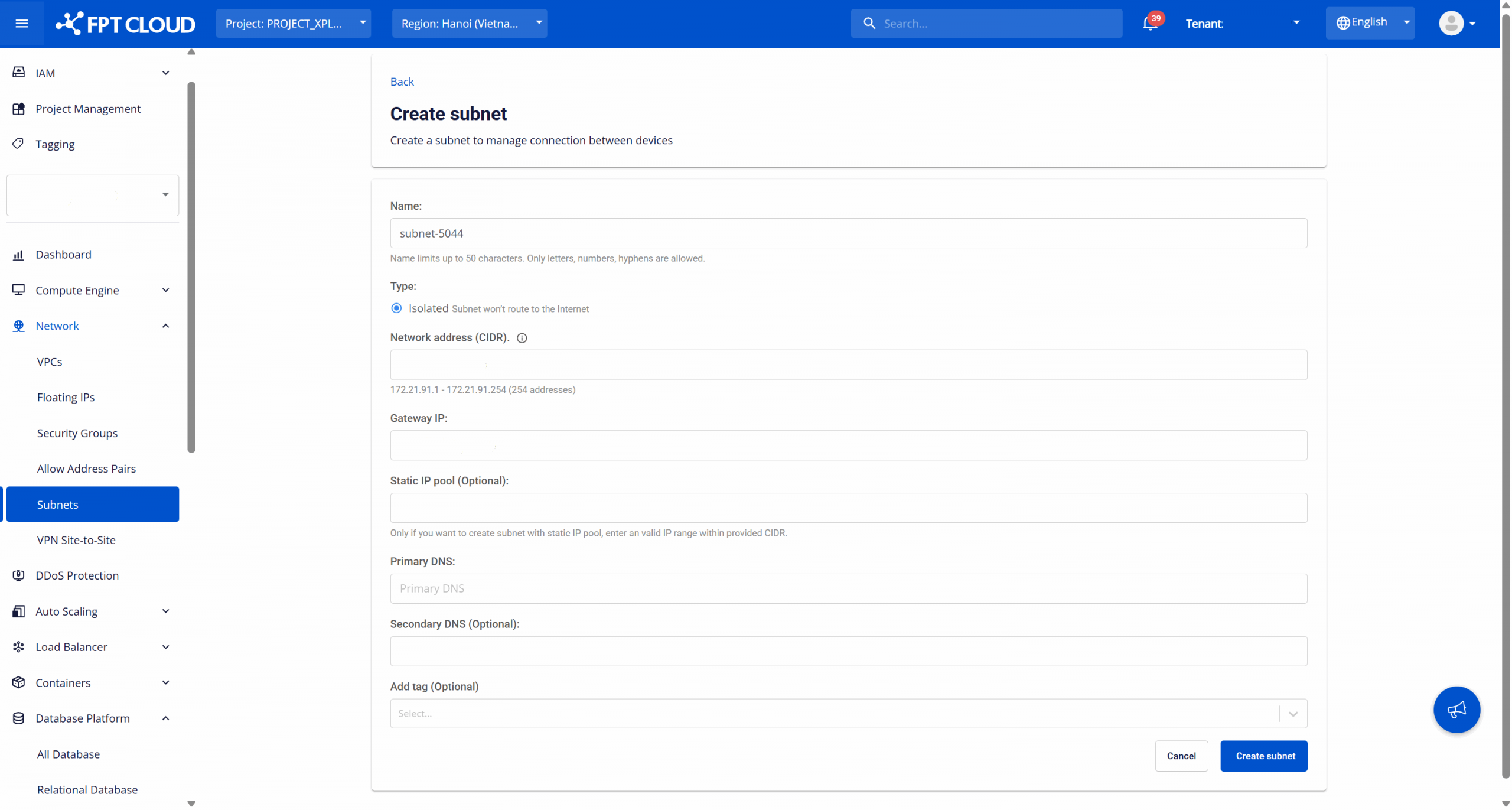
Configure the following information according to your network plan:
- Name: The identifier name of the subnet used to recognize the subnet when configuring network resources for the service. Up to 50 characters, including: letters, numbers, and hyphens ("-"). Subnet names should not duplicate other subnets in the same VPC (recommended).
- Type: The subnet type used to determine the routing behavior of the subnet. Default is Isolated - the subnet does not route to the Internet and is only used for internal network (private network). Suitable for production databases, backend services, and internal workloads.
- Network address (CIDR): Enter the IP network address range for the subnet in CIDR notation (e.g., 192.168.10.0/24). The system will check availability and display the total number of available IPs. Note: The CIDR must be a valid range and must not overlap with other subnets in the VPC.
- Gateway IP: The gateway IP address of the subnet, used as the default routing point for resources in the subnet. Usually the first IP address or an IP specified according to the internal network architecture. Gateway IP must be within the CIDR range and must not conflict with the Static IP Pool (if any).
- Static IP Pool (Optional): A static IP range reserved for allocating to resources that need a fixed IP. Only enter when needed. This IP range must be within the specified CIDR and must not include the Gateway IP.
- Primary DNS: The primary DNS server address assigned to resources in the subnet, used to resolve internal or Internet domain names (depending on the network architecture). You can use internal DNS or public DNS according to system policy.
- Secondary DNS (Optional): A backup DNS server, used when the Primary DNS is unavailable. Recommended to configure for increased reliability.
- Add tag (Optional): Assign tags (key-value) to the subnet for resource classification, cost management, or operational support and auditing.
After entering all information, select Create subnet to complete the subnet creation process.
After successful creation, the new subnet will appear in the management list and be ready to use when provisioning a database.
When needed, you can perform the following operations on a created subnet:
- Rename subnet: This feature allows modifying the name of a subnet. To do this, on the Subnet Management page, select Rename corresponding to the subnet to be edited. Make changes and click Rename subnet to save.
- Delete subnet: This feature allows removing subnets that are no longer in use, keeping the subnet management system clean and accurate. On the Subnet Management page, select Delete corresponding to the subnet to be deleted. Confirm the action in the warning dialog to complete. Warning: Renaming or deleting a subnet in use can cause network disruption for DBaaS and other services. Always ensure that dependent resources have been released before performing these operations.