Access cluster detail information
Step 1: From the menu, select Kubernetes. The Kubernetes Management page appears. Select the Managed tab. Select the Cluster you want to view details for.
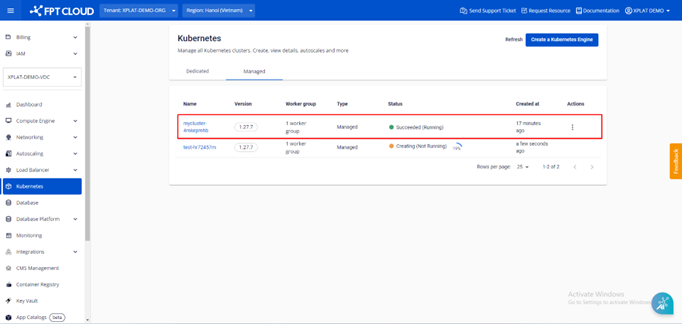
Step 2: The Essential Properties tab displays the cluster information.
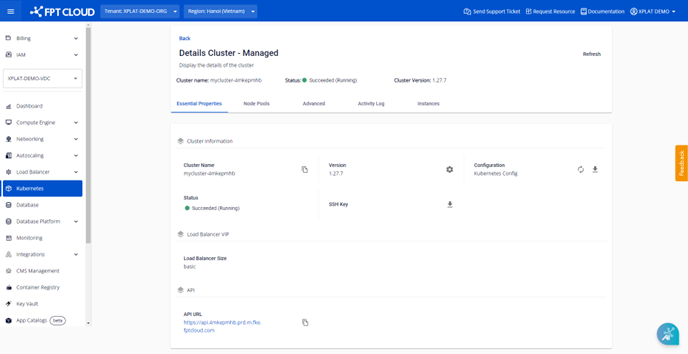
- Cluster Information: Basic cluster information including Cluster Name, Kubernetes version, Kubernetes Config file, Status, and SSH Key file.
- Load Balancer VIP: The selected LB size information.
- Worker Groups Config: List of groups and Worker Node configuration: Min/Max count, CPU, Memory, Disk.
- API: API URL.
Step 3: The Node Pools tab displays all worker groups in the cluster and the configuration details of each worker group.
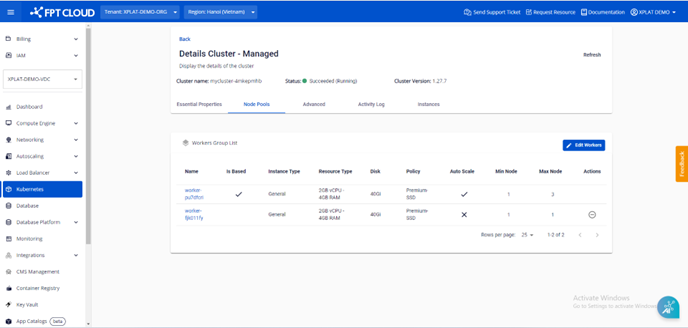
- Name: Worker group name.
- Is Based: Distinguishes base worker from regular workers.
- Instance Type: Displays the instance type (CPU or GPU).
- Resource Type: Displays the CPU and RAM count.
- Disk: Displays the disk capacity.
- Policy: Displays the selected Storage Policy.
- Auto Scale: Displays the enable/disable status of auto scale.
- Scale min: Displays the minimum Worker Node VM instance count configured for the worker group.
- Scale max: Displays the maximum Worker Node VM instance count configured for the worker group.
- Actions: Users can delete a worker group when no longer needed, but cannot delete the base worker group.