Connect behind NAT
What is NAT IP (Network Address Translation)? NAT (Network Address Translation) IP is an IP address translation mechanism that sits on a router or firewall. It converts private IP addresses inside an internal network into public IP addresses when communicating over the Internet, and vice versa.
Behind NAT IP feature for VPN Site-to-Site In some cases, a customer's VPN device does not have a public IP address assigned directly — it uses only a private IP inside the internal network (for example, placed behind a modem or ISP router). The Behind NAT IP feature of the VPN Site-to-Site service allows a device behind NAT to still initiate and maintain a VPN tunnel connection to the Internet.
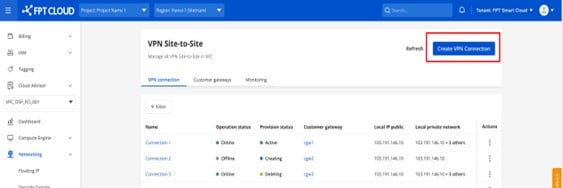
How to connect a device behind NAT IP Step 1: In the menu, select Network, then select the VPN Site-to-Site tab. This page manages VPN Connections. Select Create VPN connection.
Select Initialize VPN Gateway. After the VPN Gateway is available, select it.
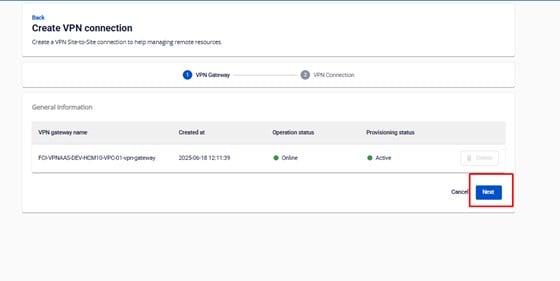
Step 2: Enter the configuration details:
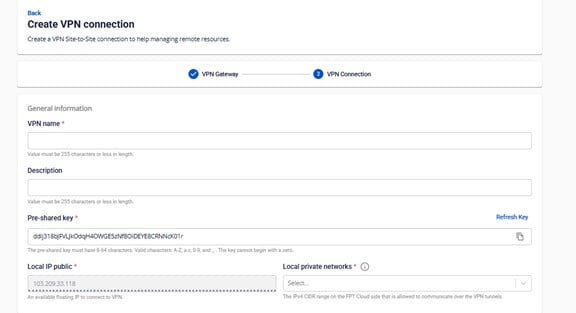
The VPN Connection parameters consist of four main sections:
- General Information (general connection details)
- Remote VPN Information (encryption settings and customer-side information)
- Dead Peer Detection (number of automatic retries when a connectivity issue occurs)
- Advanced Information (advanced settings for connecting devices behind NAT)
Section 1: General information 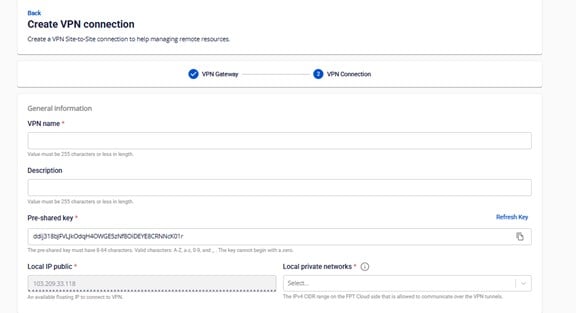
| Field | Description |
|---|---|
| VPN name | Name of the VPN Connection |
| Description | Description of the VPN Connection |
| Pre-shared key | The shared security key between the two devices. You can generate a new key by clicking Refresh Key and copy it by clicking Copy. |
| Local IP public | Public IP assigned by the FPT Cloud system |
| Local private networks | Network range of resources on FPT Cloud |
Section 2: Remote VPN Information 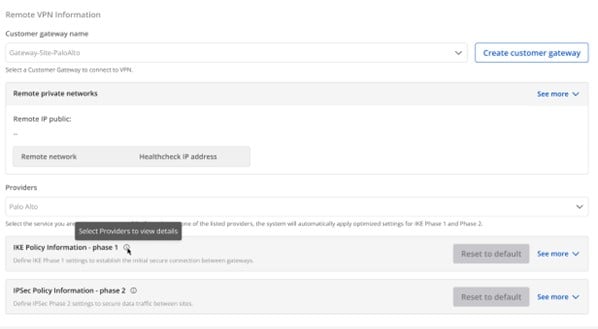
- Customer gateway name is the configuration at the other end of the connection — select the correct Customer Gateway you want to connect to in this step.
| Field | Description |
|---|---|
| Customer gateway | |
| Customer gateway | The configuration at the other end of the connection. Select the correct Customer Gateway you want to connect to in this step. If you do not have a Customer Gateway yet, click here/ for the setup guide. |
| Providers | List of VPN connection providers to FCI. |
| IKE Policy | |
| Authorization algorithm | Algorithm used to authenticate data during VPN connection establishment. Values: sha1, sha256, sha384, sha512, aes-xcbc. Use sha256 for a good balance of security and performance. |
| Encryption algorithm | Encrypts the key negotiation process. Values: aes-128, aes-192, aes-256, aes-128-gcm-8, aes-128-gcm-12, aes-128-gcm-16, aes-192-gcm-8, aes-192-gcm-12, aes-192-gcm-16, aes-256-gcm-8, aes-256-gcm-12, aes-256-gcm-16. FCI recommends aes-256 for the best balance of security and performance. If you use ikev1, do not select gcm algorithms as they will cause issues with the VPN connection. |
| IKE version | Supported IKE versions. Values: ikev1, ikev2. FCI recommends ikev2 for most firewall devices. If you use older Cisco devices that only support ikev1, select ikev1. |
| Lifetime units | Unit of measurement for the IKE connection lifetime. Default: second. |
| Lifetime value | Specific lifetime value for Phase 1. |
| DH Group | Diffie-Hellman algorithm group used to generate the initial key exchange. Values: group_1, group_2, group_5, group_14, group_15, group_16, group_17, group_18, group_19, group_20, group_21. |
| Phase 1 negotiation mode | How the two devices establish a secure connection in Phase 1 of IKE. Values: main, aggressive (default: main). |
| IPSec Policy | |
| Authorization algorithm | Algorithm used to authenticate data during VPN connection establishment. Values: sha1, sha256, sha384, sha512, aes-xcbc. Use sha256 for a good balance of security and performance. |
| Encapsulation mode | Mode in which data is encrypted and encapsulated before transmission. Default: tunnel. |
| Encryption algorithm | Encrypts the actual data transmitted over the VPN. Values: aes-128, aes-192, aes-256. Use aes-256 for the best balance of security and performance. |
| Lifetime units | Default: second. |
| Lifetime value | The duration an IPSec session is allowed to remain active before it must be re-established. |
| Perfect forward secrecy | Option to ensure session key security (PFS — typically paired with a DH Group). Values: off, group_1, group_2, group_5, group_14, group_15, group_16, group_17, group_18, group_19, group_20, group_21. Use group_14 for a good balance of security. |
| Transform protocol | Protocol used to define how encryption and authentication work in IPSec. Values: esp, ah. |
About Providers
- FCI currently supports pre-configured settings for the following providers: AWS, Fortigate, Palo Alto. FCI recommends using these settings for the best connection results.
| Configuration parameter | AWS | Fortigate | Palo Alto |
|---|---|---|---|
| IKE Info | |||
| IKE version | ikev2 | ikev2 | ikev2 |
| Encryption algorithm | aes-256 | aes-256 | aes-256 |
| Authorization algorithm | sha256 | sha256 | sha256 |
| DH Group | group14 | group14 - group19 | group14 – group20 |
| Lifetime value | 28800s | 28800s | 28800s |
| Phase 1 negotiation mode | main | main | main |
| IPSec Info | |||
| Encryption algorithm | aes-256 | aes-256 | aes-256 |
| Authorization algorithm | sha256 | sha256 | sha256 |
| Perfect forward secrecy | group14 | group14 (or group19) | group19 |
| Lifetime value | 3600s | 3600s | 3600s |
| Encapsulation mode | tunnel | tunnel | tunnel |
| Transform protocol | esp | esp | esp |
- For providers not in the list above, manually enter the IKE and IPSec information that matches your connection configuration.
Section 3: Dead Peer Detection 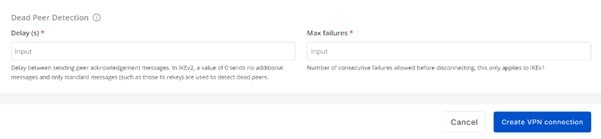
| Field | Description |
|---|---|
| Delay (s) | Time (in seconds) between each DPD probe sent to check the connection. Default: 30s. |
| Max failures | Maximum number of failed checks before the peer is considered dead and the connection is reset. Default: 10. |
Section 4: Advanced Information 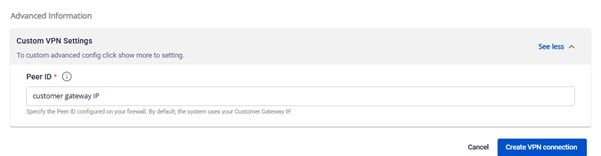
| Field | Description |
|---|---|
| Peer ID | The identifier (original IP address) of the customer's VPN device during VPN establishment (IKE negotiation). By default, the system uses the Customer Gateway IP. If you are using a NAT IP, verify the original IP address (before NAT) and enter it in this Peer ID field. |
After filling in all the VPN Connection details, select Create VPN Connection to proceed or Cancel to discard.