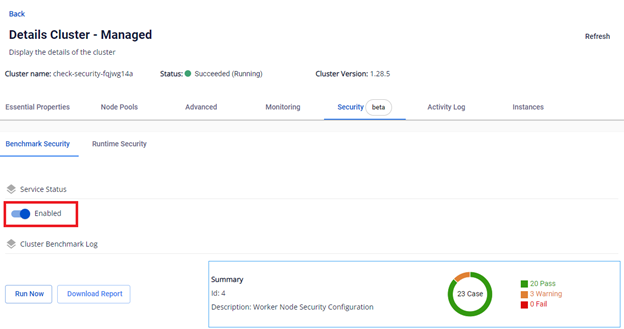
Cluster Benchmark feature
1. Overview of the Benchmark Security feature
To ensure information security for FPT Cloud Managed Kubernetes clusters, FPT Cloud provides a feature that allows administrators to benchmark kubelet configurations and settings on worker nodes against the standards proposed by the Center for Internet Security (CIS).
CIS Benchmarks are a comprehensive set of security configuration guidelines developed by the Center for Internet Security. These guidelines provide best practices for securing systems, services, and software.
Test cases are applied per Kubernetes version and have been adjusted to match FPT Cloud's kubelet configuration.
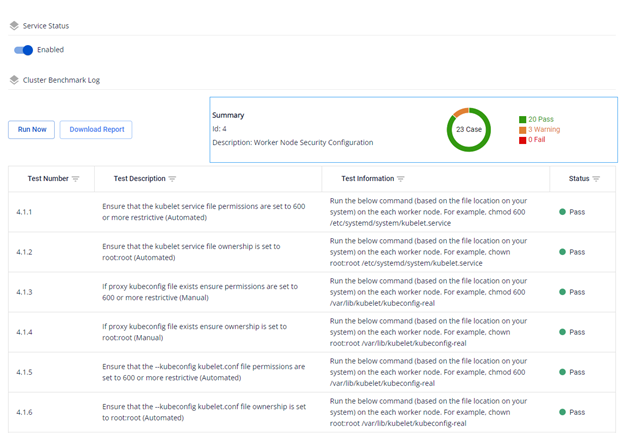
Each test case result can be one of three types: Pass, Fail, or Warning. Pass indicates the configuration satisfies the CIS test case. Fail indicates the configuration does not meet a high-importance test case. Warning indicates the configuration does not meet a test case of lower importance (optional to configure).
2. Using the feature on Unify Portal
Note: Security enhancement features for Managed Kubernetes Cluster are integrated after the cluster is successfully created (status: Succeeded/Running).
A. Enable Benchmark Security:
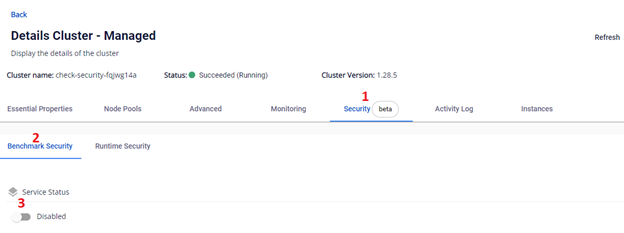
Go to FPT Cloud portal console.fptcloud.com, select Kubernetes, click on the cluster you want to benchmark, go to the Security tab, select the Benchmark Security tab, then enable it:
After the benchmark job runs successfully, detailed results are displayed. You can re-run the benchmark to get the latest results or download the results to your machine.
B. Disable Benchmark Security:
Go to FPT Cloud portal console.fptcloud.com, select Kubernetes, click on the cluster, go to the Security tab, select the Benchmark Security tab, then confirm to disable: