Database operations
This section explains how to operate databases on FPT Cloud Portal. You can perform start, stop, restart, and delete operations appropriate to the cluster lifecycle state.
Operations
- Start: Starts a database cluster that is in a stopped state. When the operation is performed, the cluster status transitions to "Starting" and then to "Running" when ready to serve.
- Stop: Stops a running database cluster. When stopped, the cluster temporarily suspends workload processing. The status transitions to "Stopping" and then to "Stopped". In this state, the database does not serve access but can be restarted when needed.
- Restart: Restarts a running database cluster. This operation stops and restarts the cluster, typically used to apply configuration changes or resolve temporary issues. The status displays "Restarting" and returns to "Running" when complete.
- Delete: Deletes a database cluster and all associated data. This action cannot be undone. After successful deletion, the cluster is removed from the list and associated resources are released.
Status and available operations
| Status | Meaning | Available operations |
|---|---|---|
| Processing | The database is being initialized. | Delete |
| Running | The database is operating normally. | Stop, Restart, Delete |
| Stopped | The database has been stopped. | Start, Delete |
| Warning | The database is operating unstably. | Delete |
| Failed | The database has encountered an unknown error. If no longer needed, delete the database to free resources, or contact FPT Support for assistance. | Delete |
Performing operations
To perform operations, open the Database list page, then click the "⋯" (More actions) icon in the "Action" column of the database to operate on. The list of available actions will be displayed:
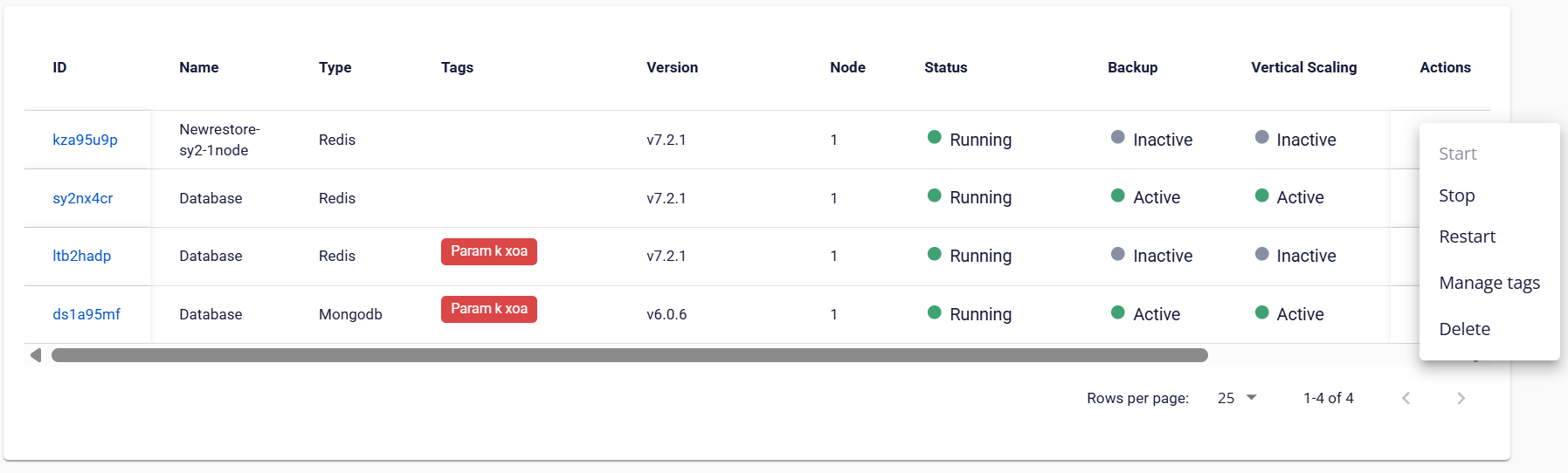
When an action is selected, the system will display a confirmation dialog. You must manually confirm to proceed, to avoid performing unintended operations, especially for actions that cannot be undone.
After confirmation, the system will execute the action within approximately 5–7 minutes. During this time, other operations on the database will be temporarily disabled until the process completes.